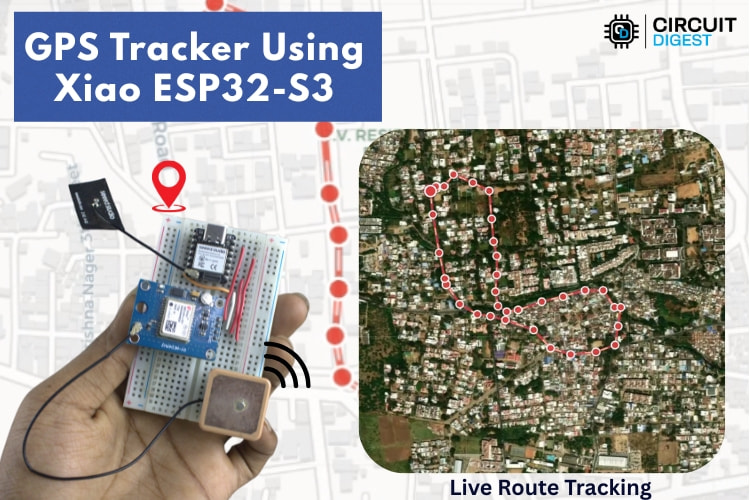
Build a compact GPS tracker using Seeed Studio XIAO ESP32-S3 with real-time location tracking, geofencing alerts, and cloud dashboards.
Overview
This project demonstrates how to build a compact, low-power GPS tracker using the Seeed Studio XIAO ESP32-S3, combining precise location tracking with intelligent geofencing capabilities. Designed with makers and IoT enthusiasts in mind, it walks through the complete hardware and firmware setup needed to track assets, vehicles, or personal devices in real time.
The tracker integrates a GPS module with the ESP32-S3’s built-in Wi-Fi and Bluetooth connectivity to transmit location data to a cloud platform. By defining virtual boundaries (geofences), the system can automatically trigger alerts whenever the device enters or exits a designated area—an essential feature for security, logistics, and smart mobility applications. The project also highlights efficient power management techniques, making it suitable for battery-powered deployments.
With clear schematics, code explanations, and real-world use cases, this build is ideal for makers looking to explore IoT tracking systems, location-based automation, or ESP32-S3 development
Core Components You’ll Need
Hardware
- Seeed Studio XIAO ESP32-S3: Handles Wi-Fi connectivity, processing, and GPS data transmission.
- Neo-6M GPS Module: Captures GPS signals and outputs location coordinates.
- External GPS Antenna: Improves signal reception.
- Breadboard & Jumper Wires: For prototyping without soldering.
Software
- Arduino IDE: To write and upload code.
- Libraries:
- GeoLinker Library – for secure cloud communication
- TinyGPSPlus – to parse GPS sentences
- WiFiClientSecure – for HTTPS connectivity
What This GPS Tracker Does
This DIY tracker combines GPS hardware with cloud APIs to deliver a feature-rich tracking solution:
- Real-time location tracking over Wi-Fi
- Geofencing alerts that notify you when the device leaves a virtual boundary
- SMS alerts with precise coordinates
- Offline data buffering so no points are lost when Wi-Fi disconnects
- Interactive map visualisation via a free cloud service called GeoLinker
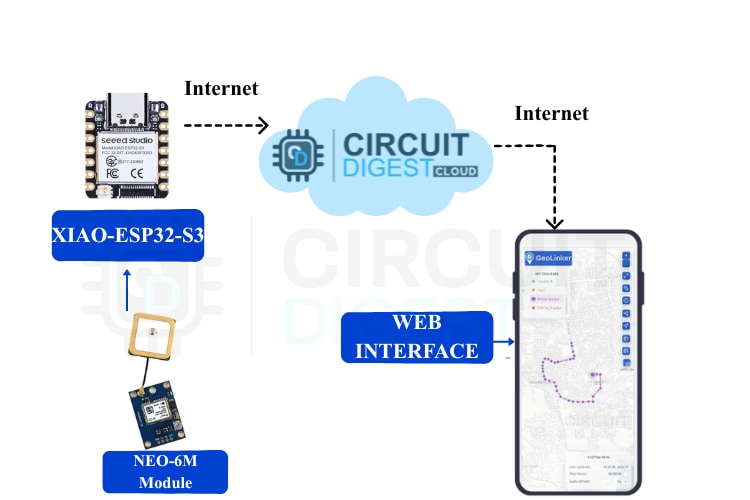
How It Works: Conceptual Overview
- GPS Data Acquisition
- The Neo-6M GPS module receives signals from satellites and calculates latitude/longitude coordinates.
- Microcontroller Processing
- The XIAO ESP32-S3 reads GPS data over UART and prepares it for cloud transmission.
- Wi-Fi Upload to Cloud
- Coordinates are pushed to the GeoLinker cloud service at regular intervals.
- Geofence Logic
- The firmware continuously checks the distance between the current location and a predefined “home” point using the Haversine formula.
- Alert System
- If the device crosses the set geofence radius, an SMS notification is sent with the current GPS coordinates via the cloud API.
- Offline Support
- When Wi-Fi is unavailable, GPS points are locally buffered and uploaded automatically once connectivity is restored.
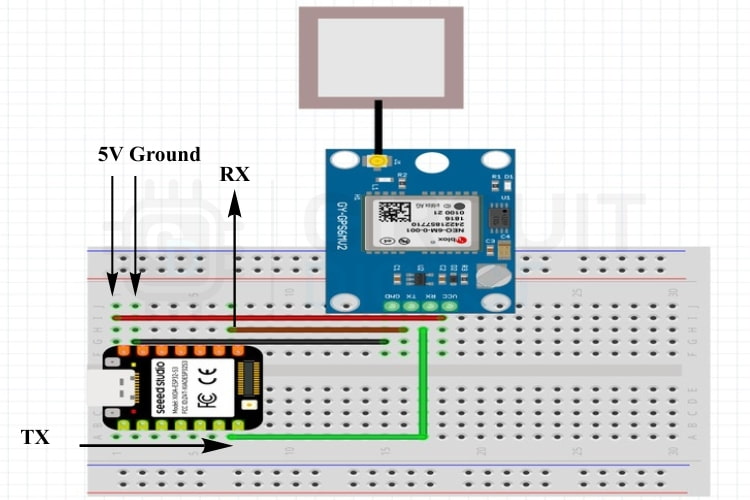
Circuit and Wiring
Connect the Neo-6M module to the XIAO ESP32-S3 as follows:
GPS Module PinXIAO ESP32-S3 PinFunctionVCC5VPowerGNDGNDGroundTXGPIO 44 (RX)GPS → MicrocontrollerRXGPIO 43 (TX)Optional configuration port
Ensure the GPS antenna is fitted securely for reliable positioning.
Setting Up GeoLinker and API Keys
- Sign up on the GeoLinker platform: Create a free cloud account.
- Generate an API key: Use it in your sketch to authorize data uploads and SMS alerts.
- Link your mobile number: Required to receive SMS notifications.
The free tier typically offers 10,000 data points and a quota on SMS messages, enough for development and testing.
Source Code Highlights
The Arduino sketch includes:
- Wi-Fi setup
- GPS parsing with TinyGPSPlus
- Cloud communication via GeoLinker
- Geofence detection and SMS trigger logic
- Offline buffering
You define variables such as:
ssid, password (Wi-Fi credentials)apiKey and deviceIDupdateInterval and geofence radius- Home latitude/longitude
The code continuously reads GPS fixes, calculates distance, and sends alerts when thresholds are exceeded.
Testing and Results
To test the system:
- Connect the device to a Wi-Fi hotspot (e.g., a phone hotspot).
- Upload your sketch and monitor the GeoLinker dashboard.
- Move around to simulate motion relative to your geofence.
If the device crosses the set virtual boundary, you’ll receive an SMS with the latitude and longitude, and the movement history will appear on the map.
Applications and Next Steps
This project unlocks many maker scenarios:
- Vehicle & asset tracking
- Child, elderly, or pet safety systems
- Route history and movement analytics
- Multiple geofences and customizable alerts
You can also enhance it with battery monitoring, speed alerts, or additional sensors.
Conclusion
This DIY GPS Tracker using Seeed Studio Xiao ESP32-S3 demonstrates how powerful modern microcontrollers can eliminate traditional constraints such as cellular modules and expensive data plans. With Wi-Fi connectivity, cloud logging, geofencing, and SMS alerts, you get a flexible and maker-friendly solution ready for real-world applications.