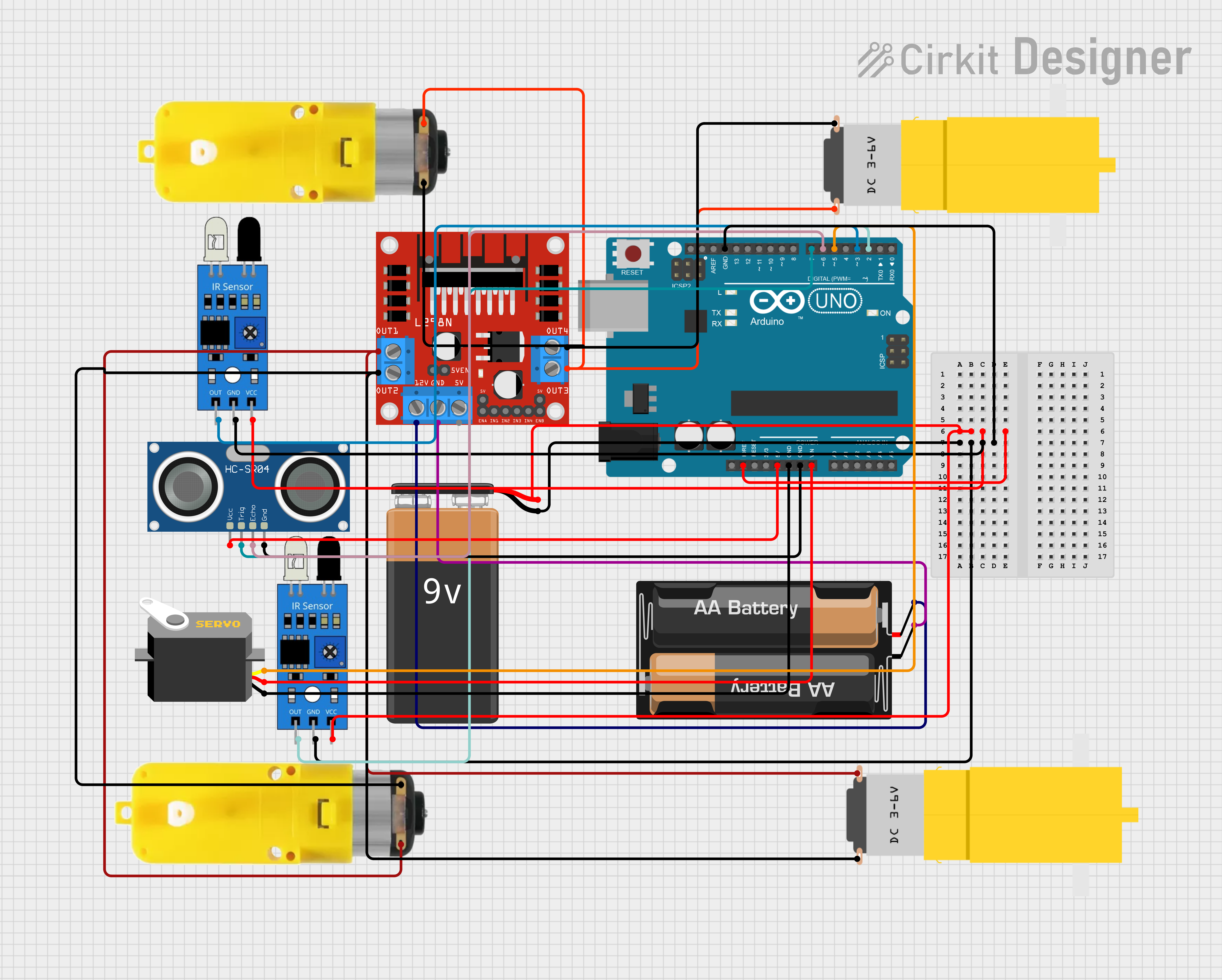
It is an example circuit diagram of a human or an object following bot.
The code for the bot is as follows: """ // For motor control with Adafruit Motor Shield
#include <Servo.h> // For controlling the servo motor
// Motor Driver Pins
int motor1pin1 = 8;
int motor1pin2 = 9;
int motor2pin1 = 10;
int motor2pin2 = 11; // Right motor
// Ultrasonic Sensor Pins
const int trigPin = 7; // Trig pin
const int echoPin = 6; // Echo pin
// IR Sensor Pins
const int irLeftPin = 2; // Left IR sensor
const int irRightPin = 3; // Right IR sensor
// Servo Pin
const int servoPin = 5; // Servo motor pin
// Create Servo object
Servo myServo;
// Variables
long duration;
long distance;
int minDistance = 10; // Minimum distance to trigger robot to stop (in cm)
int maxDistance = 30; // Max distance to follow a person (in cm)
void setup() {
// Initialize serial communication for debugging
Serial.begin(9600);
// Motor control setup
// Ultrasonic sensor setup
pinMode(trigPin, OUTPUT);
pinMode(echoPin, INPUT);
pinMode(motor1pin1, OUTPUT);
pinMode(motor1pin2, OUTPUT);
pinMode(motor2pin1, OUTPUT);
pinMode(motor2pin2, OUTPUT);
// IR sensor setup
pinMode(irLeftPin, INPUT);
pinMode(irRightPin, INPUT);
// Servo setup
myServo.attach(servoPin); // Attach the servo motor to the pin
myServo.write(90); // Start servo at neutral position (middle)
}
long readDistance() {
// Clear the trigPin
digitalWrite(trigPin, LOW);
delayMicroseconds(2);
// Send a 10 microsecond pulse to trigger the ultrasonic sensor
digitalWrite(trigPin, HIGH);
delayMicroseconds(10);
digitalWrite(trigPin, LOW);
// Measure the time for the pulse to return to the echoPin
duration = pulseIn(echoPin, HIGH);
// Calculate distance in cm
distance = (duration / 2) / 29.1;
return distance;
}
void moveForward() {
digitalWrite(motor1pin1, HIGH);
digitalWrite(motor1pin2, LOW);
digitalWrite(motor2pin1, HIGH);
digitalWrite(motor2pin2, LOW);
}
void moveBackward() {
digitalWrite(motor1pin1, LOW);
digitalWrite(motor1pin2, HIGH);
digitalWrite(motor2pin1, LOW);
digitalWrite(motor2pin2, HIGH);
}
void stopMotors() {
digitalWrite(motor1pin1, LOW);
digitalWrite(motor1pin2, LOW);
digitalWrite(motor2pin1, LOW);
digitalWrite(motor2pin2, LOW);
}
void turnLeft() {
digitalWrite(motor1pin1, LOW);
digitalWrite(motor1pin2, HIGH);
digitalWrite(motor2pin1, HIGH);
digitalWrite(motor2pin2, LOW);
}
void turnRight() {
digitalWrite(motor1pin1, HIGH);
digitalWrite(motor1pin2, LOW);
digitalWrite(motor2pin1, LOW);
digitalWrite(motor2pin2, HIGH);
}
void loop() {
// Read the distance from the ultrasonic sensor
long distance = readDistance();
Serial.print("Distance: ");
Serial.println(distance);
// Check IR sensors for obstacles (simple obstacle detection)
int leftIR = digitalRead(irLeftPin);
int rightIR = digitalRead(irRightPin);
if (distance > minDistance && distance < maxDistance) {
// Move forward if a person is detected within the desired range
moveForward();
}
else if (distance < 10) {
// Stop the motors if no person is detected within range
moveBackward();
}
else {
stopMotors();
}
// If there's an obstacle detected on the left, turn right
if (leftIR == HIGH && rightIR == LOW) {
turnRight();
delay(500); // Turn for 0.5 seconds to avoid obstacle
stopMotors();
}
// If there's an obstacle detected on the right, turn left
else if (rightIR == HIGH && leftIR == LOW) {
turnLeft();
delay(500); // Turn for 0.5 seconds to avoid obstacle
stopMotors();
}
// If there are no obstacles, continue moving forward
delay(10); // Small delay to avoid excessive loop speed
}
"""