So in this article, we will interface the popular MAX30102 pulse oximeter and heart rate sensor with Arduino and in the process we will learn how this sensor works.
A digital pulse oximeter and heart rate sensor is an electronic device which can measure the heart rate of a person by measuring the difference between oxygen-rich and oxygen-less blood. Not only heart rate, this device can also measure the concentration of oxygen in blood. So in this article, we will interface the popular MAX30102 pulse oximeter and heart rate sensor with Arduino and in the process learn how this sensor works. So without further ado let's get right into it.
The MAX30102 Pulse Oximeter and Heart Rate Sensor
The MAX30102 is a very versatile sensor and it can also measure body temperature other than heart rate and blood oxygen level. This is a sensor designed by Analog Devices and features two LEDs (one Infrared and one Red), a photodetector, optics, and a low-noise signal processing unit to detect pulse oximetry (SpO2) and heart rate (HR) signals.
Circuit Diagram
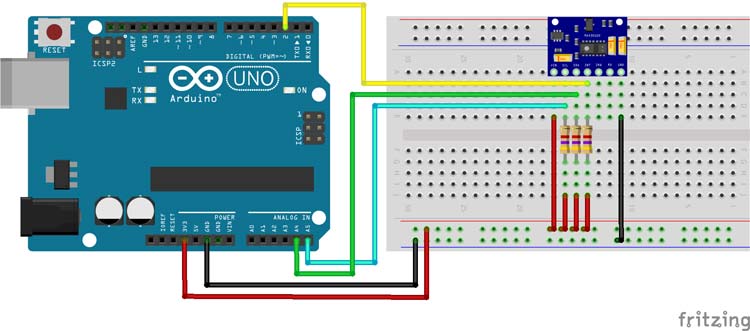
Now Let's connect all the required wires to Arduino and then write our code to get the data out of the sensor module. The use the MAX30102 Arduino Connection Diagram given below.
Connecting the MAX30102 Pulse Oximeter to the microcontroller is really simple. As we all know, to communicate with the sensor we need to connect the I2C line which are A5 and A4 of the Arduino board to the sensor board. We also need to connect the INT or Interrupt pin of the sensor to the D2 of the Arduino. At last, we need to connect the VCC and ground pins to the 3.3V pin and Ground pin of the Arduino. A hardware image of the setup is shown below.
For more detailed information check out the MAX3012 tutorial.
Title here
Code
#include <Wire.h>
#include "MAX30105.h"

#include "heartRate.h"

MAX30105 particleSensor;

const byte RATE_SIZE = 4; //Increase this for more averaging. 4 is good.
byte rates[RATE_SIZE]; //Array of heart rates
byte rateSpot = 0;
long lastBeat = 0; //Time at which the last beat occurred

float beatsPerMinute;
int beatAvg;

void setup()
{
  Serial.begin(115200);
  Serial.println("Initializing...");

  // Initialize sensor
  if (!particleSensor.begin(Wire, I2C_SPEED_FAST)) //Use default I2C port, 400kHz speed
  {
    Serial.println("MAX30105 was not found. Please check wiring/power. ");
    while (1);
  }
  Serial.println("Place your index finger on the sensor with steady pressure.");

  particleSensor.setup(); //Configure sensor with default settings
  particleSensor.setPulseAmplitudeRed(0x0A); //Turn Red LED to low to indicate sensor is running
  particleSensor.setPulseAmplitudeGreen(0); //Turn off Green LED
}

void loop()
{
  long irValue = particleSensor.getIR();

  if (checkForBeat(irValue) == true)
  {
    //We sensed a beat!
    long delta = millis() - lastBeat;
    lastBeat = millis();

    beatsPerMinute = 60 / (delta / 1000.0);

    if (beatsPerMinute < 255 && beatsPerMinute > 20)
    {
      rates[rateSpot++] = (byte)beatsPerMinute; //Store this reading in the array
      rateSpot %= RATE_SIZE; //Wrap variable

      //Take average of readings
      beatAvg = 0;
      for (byte x = 0 ; x < RATE_SIZE ; x++)
        beatAvg += rates[x];
      beatAvg /= RATE_SIZE;
    }
  }

  Serial.print("IR=");
  Serial.print(irValue);
  Serial.print(", BPM=");
  Serial.print(beatsPerMinute);
  Serial.print(", Avg BPM=");
  Serial.print(beatAvg);

  if (irValue < 50000)
    Serial.print(" No finger?");

  Serial.println();
}