Introduction: What If Your Microcontroller Could Talk Without the Cloud?
Voice interfaces have become a natural part of our daily tech — from smart assistants to speaking alarms. But most text-to-speech (TTS) systems rely heavily on cloud services, which creates limitations: network delays, reliability issues, API costs, and privacy concerns.
Now imagine giving your project the ability to talk using nothing but an ESP32, a tiny amplifier, and a speaker.
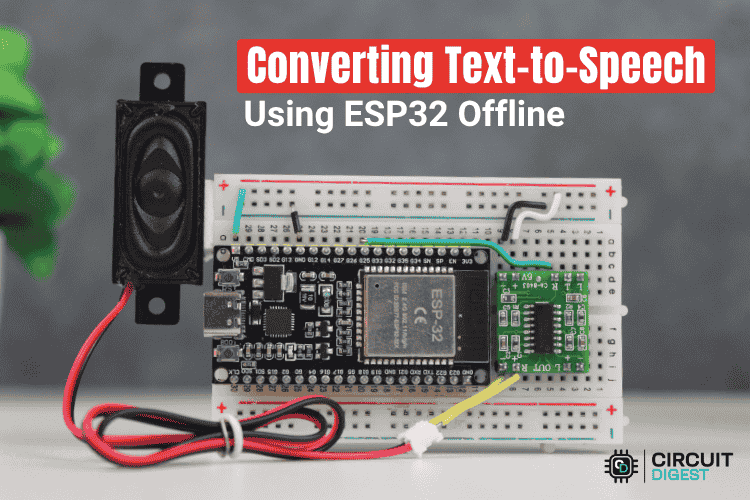
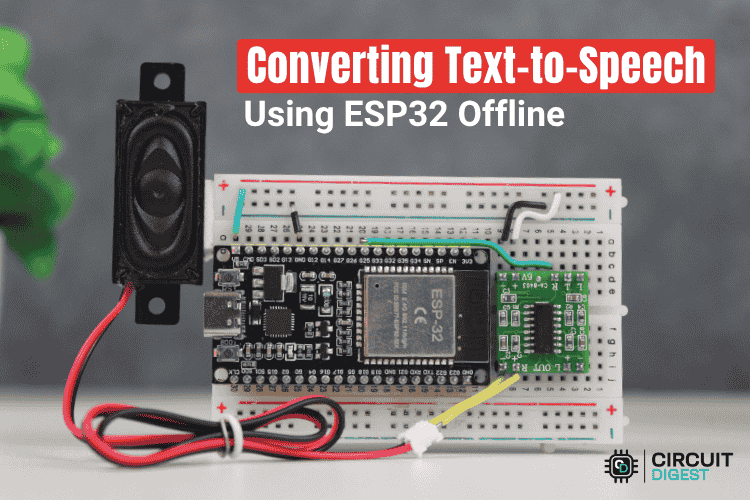
That’s exactly what this offline Text-to-Speech system achieves. It’s a compact, low-cost, internet-free solution that converts typed text into audible speech using the ESP32’s onboard DAC and an LPC-encoded vocabulary.
Whether you're building sensor alerts, educational gadgets, automation dashboards, or accessibility tools — this project gives your device a human-like voice without ever reaching the internet.
How It Works — The Simple Architecture
- Text input: You feed a sentence via the serial monitor (or integrate with another input method).
- Word parsing & lookup: The ESP32 splits the sentence into words and checks each against a vocabulary list.
- Speech generation: If the word exists in the vocabulary, the system uses the Talkie library to play its pre-recorded LPC (Linear Predictive Coding) audio via the ESP32’s DAC pin.
- Amplification & output: The analog signal goes through a small amplifier (like PAM8403) and then to a speaker — producing audible speech.
This lean architecture keeps memory and hardware requirements low — ideal for embedded applications where resources are limited.
Why Offline TTS Matters
Here’s why makers love this approach:
✔️ Works Anywhere
Factories, workshops, fields, remote installations — this TTS system needs no Wi-Fi, no cellular, no cloud.
✔️ Beginner & Maker-Friendly
Minimal wiring, no specialised hardware, and fully open-source components.
✔️ Cost-Effective
No APIs, no subscriptions, no hidden dependencies.
✔️ Fully Customizable Vocabulary
Add your own words, alerts, or custom phrases simply by expanding the LPC vocabulary list.
✔️ Privacy Respecting
No speech data leaves the device — ideal for personal assistant gadgets or safety-critical environments.
Required Components
- ESP32 Development Board
- PAM8403 or similar audio amplifier
- 8Ω speaker (any small speaker works)
- Breadboard + jumper wires
- USB cable & Serial Monitor
Everything here is widely available and inexpensive — making it perfect for classrooms, prototypes, and hobby projects.
How It Works: A Maker-Friendly Breakdown
1. Input Stage — Type Your Text
The user enters a sentence through the Arduino serial monitor. The code reads the input as a full string.
2. Word Parsing
The ESP32 breaks the sentence into individual words and processes them one at a time.
3. Vocabulary Lookup
Each word is checked against a preloaded dictionary of LPC-encoded audio clips.
If the word exists → it plays the audio.
If not → the system reports “Word not found”.
4. Audio Playback Through DAC
The ESP32 outputs LPC-decoded audio through GPIO25 or GPIO26 (built-in DAC pins).
5. Amplification & Output
The signal is fed into a small PA amplifier and then into a speaker — producing a clear, robotic-style spoken voice.
Why the System Uses LPC Audio
LPC (Linear Predictive Coding):
- Uses minimal memory
- Plays efficiently on microcontrollers
- Produces recognisable speech
- Works perfectly for short alerts, words, or phrases
While LPC doesn’t provide natural human speech, its compactness makes it ideal for embedded voice.
Limitations (And Why They’re Acceptable)
- Limited vocabulary: Only pre-stored words can be spoken.
- Robotic voice: LPC isn’t natural-sounding — but that’s part of the charm.
- Simple grammar: Plays words sequentially without phoneme blending.
For maker-level voice feedback, alerts, and interactive gadgets, these trade-offs are more than reasonable.
Step-By-Step: Building the Hardware
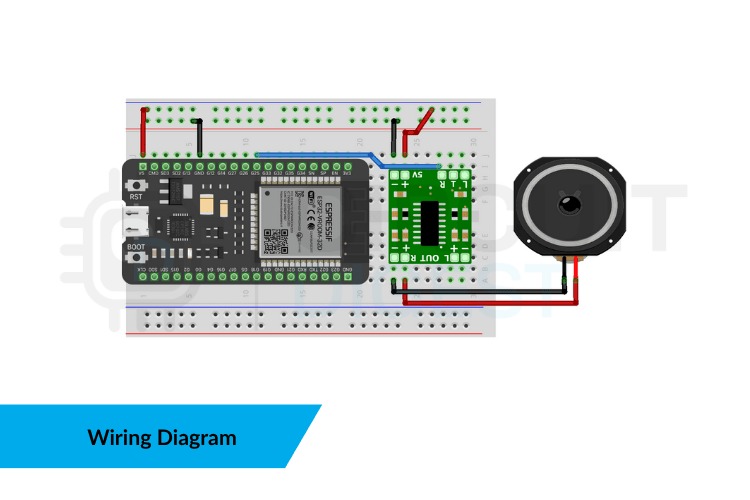
- Connect ESP32 DAC pin (GPIO25) → PAM8403 amplifier input
- Connect amplifier output → speaker
- Power everything using USB or a regulated 5V source
- Upload the code and open the Serial Monitor
- Type any supported word or phrase — and hear your device speak
The hardware wiring is minimal — ideal even for first-time makers.
Customising the System
Here’s where the fun begins. You can…
- Add hundreds of custom words
- Build custom alert systems (“Temperature High”, “Door Open”, etc.)
- Integrate sensors and have the ESP32 announce readings
- Add buttons to trigger spoken messages
- Use it in robotics as a vocal feedback module
- Create accessible devices for visually impaired users
Because the system is modular, you can embed it into nearly any IoT or electronic project.
Use-Cases for Makers
🔧 DIY Smart Gadgets
Talking clocks, reminders, handheld learning toys, voice-guided tools.
⚡ Sensor-Based Alerts
Humidity warnings, smoke alarms, temperature notifications.
🤖 Robotics
Speech feedback for movement, mode changes, or instructions.
🛠️ Workshops and Labs
Audible system status in noisy environments.
♿ Accessibility Tools
Low-cost, offline assistive communication devices.
Troubleshooting Tips
- Low audio output? Check amplifier gain and speaker impedance.
- Word not recognised? Ensure exact matching in the vocabulary list.
- Audio distorted? Reduce volume or check power supply stability.
These small tweaks usually solve most issues.
Final Thoughts: Your ESP32 Can Speak — Anywhere, Anytime
This ESP32 Text to Speech offline system is more than a fun build — it’s a practical foundation for countless maker projects. By combining lightweight LPC audio with the ESP32’s processing power, you unlock a tiny, always-available voice engine that works where cloud-based TTS simply can’t.