This post was originally published on extralongdivision.com
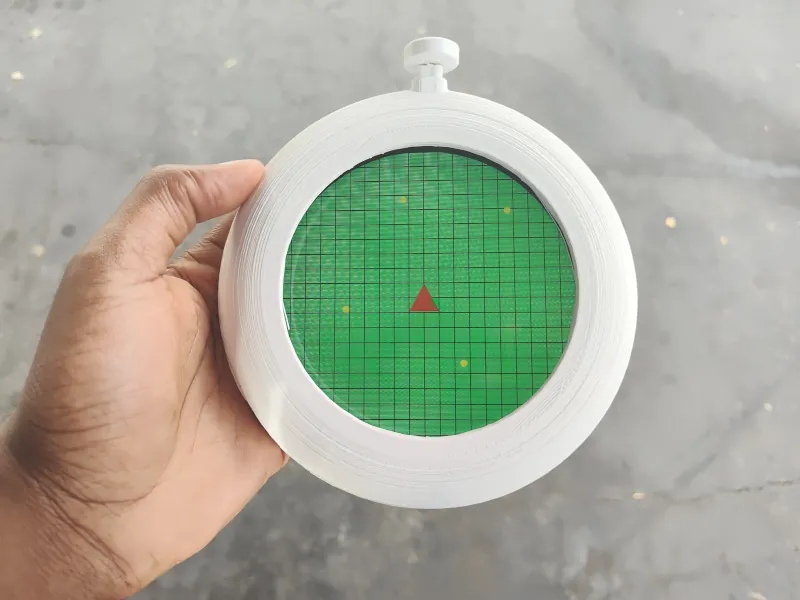
Over the past couple of months, I’ve been making a replica Dragon Radar from Akira Toriyama's Dragon Ball series. The project now looks pretty close to its anime inspiration. This post will condense all the design decisions made into one place. For nitty-gritty details, read the previous series of developer logs.
Capabilities
Before I get into how I made the project, let’s go over what it can actually do. It’s pretty simple: press the button and the radar starts beeping and shows a graphic indicating nearby dragon balls.

In the future, it’d be cool to make replica dragon balls that the radar can detect. Ideally, beeping faster depending on how close the ball is while also indicating the ball’s proximity on screen. Perhaps in a future version.
Electrical Design
The circuitry contains a handful of components:
- A microcontroller
- An audio amplifier
- A display
- Battery charger
- Battery monitor
The schematic is a combination of Adafruit's Qualia and Adafruit's ESP32-S3 Feather. Instead of explaining the schematic, you can study or modify it yourself. I’ve released the KiCAD project as Solderpad Hardware License 2.1.

Mechanical Design
The Dragon Radar’s enclosure is designed for 3D printing. There’s only four components.
- The enclosure
- The enclosure back
- The button shaft
- The button cap
Heat-set inserts need to be installed into the 3D-printed parts for everything to assemble together. Using a FDM, printer, all the parts took ~17 hours to print. The enclosure front and back were the biggest time sinks.
Again, print the radar for yourself from the files available on the project's repository. For step-by-step instructions on how to build the radar, follow this tutorial.
Software
All the code is written in CircuitPython. The microcontroller is a ESP32-S3 and the board is programmed via a USB-C connector, so you could use just about any toolchain you want to modify the firmware.
Honestly, the code is messy. It also doesn’t implement all the hardware. I.e the battery monitor doesn’t do anything nor is the backlight brightness programmable. And it probably should be a finite state machine instead of a bunch of if else statements. The code is permissively released under Apache-2.0, so please improve it.
Next Steps
As said earlier, a tutorial is already out. I’ve finally documented the project's repository as well. Development for this phase is over. If you’d like to see more updates, shoot me an email or message me on social media. I’ll be posting some video content of the radar and start working on my next project.