Start with the question the file can answer
A sustained note can involve a pedal switch or sensor, a keyboard's settings, a MIDI connection, a recorder and a receiving sound engine. A Standard MIDI File shows only the events that reached the export. Before replacing a pedal or changing instrument settings, it can help to ask a narrower question: which sustain-controller values were actually saved, on which channel, and when?
MIDI Sustain Report is a small open-source Python tool for that inspection. It reads a local file and prints JSON. It does not open a MIDI port, send messages, alter the file, play sound or contact a server. This tutorial uses a deliberately generated 59-byte example rather than claiming a measurement of a real piano.
Run the existing tool on the supplied example
Download the repository and use Python 3.10 or newer. Create a virtual environment, install the pinned dependency from requirements.txt, and run sustain_report.py with the supplied pedal-threshold-example.mid. The dependency is Mido 1.3.3; downloading it requires an internet connection. Reading the file after installation does not.
The repository includes its own demo.mid. The additional file attached to this tutorial exercises both sides of the CC64 threshold and a reset marker. Keep the example's name when comparing its report with the table below. A successful run exits with status 0; an unsupported or malformed file exits with status 2 and an explanation on stderr. The program writes the report to stdout without creating a report file automatically.
macOS / Linux
python3 -m venv .venv
.venv/bin/python -m pip install -r requirements.txt
.venv/bin/python sustain_report.py pedal-threshold-example.mid
Windows
py -m venv .venv
.venv\Scripts\python.exe -m pip install -r requirements.txt
.venv\Scripts\python.exe sustain_report.py pedal-threshold-example.mid
Read the boundary values before interpreting the result
For the MIDI 1.0 damper-pedal switch interpretation, CC64 values 0 through 63 mean off, and 64 through 127 mean on. The report retains the original number as well as that category. In this example, 63 is off and 64 is on. The larger values 96 and 127 are still classified as on; they do not become measurements of pedal travel.
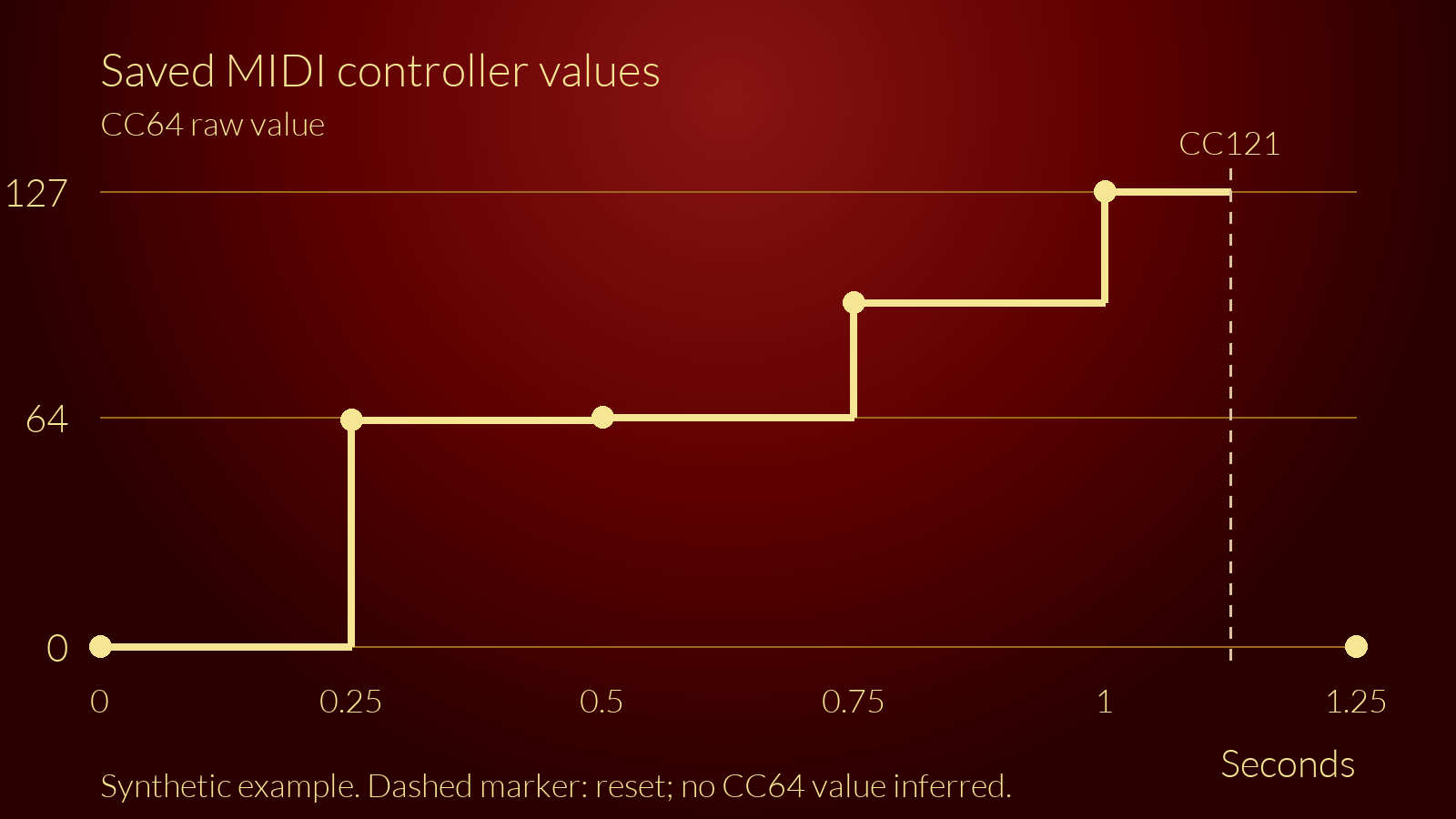
The example uses 480 ticks per quarter note and a constant tempo of 500,000 microseconds per quarter note. That makes 240 ticks equal to 0.25 seconds. The report's seven controller rows are reproduced below. Its final active_at_end value is false because the last observed CC64 is zero.
Tick | Seconds | Channel | Controller | Raw value | Observation
0 | 0 | 1 | 64 | 0 | off
240 | 0.25 | 1 | 64 | 63 | off
480 | 0.5 | 1 | 64 | 64 | on
720 | 0.75 | 1 | 64 | 96 | on
960 | 1 | 1 | 64 | 127 | on
1080 | 1.125 | 1 | 121 | 0 | unknown
1200 | 1.25 | 1 | 64 | 0 | off
Understand why the reset row says unknown
At tick 1080 the file contains CC121, Reset All Controllers. The tool records that marker and makes its observation model unknown until the next CC64. It deliberately does not assert which controllers a particular receiver resets or how that receiver's current voice will respond. In this example, CC64 at tick 1200 provides a new explicit off observation.
The same caution matters at the beginning of a file. Before the first relevant event, the earlier controller state is unknown. If a file ends after an on event, that describes the last saved observation. It does not prove that a physical pedal remained pressed or that a synthesizer continued sounding.
Apply the method to an export from your own setup
If your recorder supports it, record a short MIDI passage while pressing and releasing the connected damper pedal. Check its manual for controller recording and export filters. Export a copy, keep the original session, and inspect the resulting file. Confirm that the expected channel appears and compare raw values and event times with the action you intended to record.
If no relevant events appear, check the capture and export path before diagnosing the pedal. The tool cannot reconstruct messages filtered out by the recorder. If the same passage is exported twice, compare equivalent channels and settings. Audio recordings, written notes and the exact keyboard and pedal models can add context, but this report alone cannot locate a faulty contact, establish pedal compatibility or measure latency.
Keep timing and file-format limits visible
The program supports synchronous SMF types 0 and 1 with PPQN timing. Tempo changes are integrated into the reported seconds; raw ticks are retained. Tracks are not independent MIDI channels. If conflicting controller events share a tick and channel across different tracks, the report warns about uncertain ordering rather than treating its display order as a known receiver sequence.
Type 2 files, SMPTE timing, MIDI-port metadata and inputs beyond the documented resource limits are rejected. CC120 and CC123 are not relabelled as sustain-off, and SysEx is not interpreted. These limits make the output narrower and more explicit; they are reasons to consult the original data, not evidence that an instrument is broken.
Reproduce and reuse
The tutorial's attached MIDI file and displayed values were checked by running the unchanged published tool. The source repository also contains independently constructed byte-level tests. Code and documentation are available under MIT; Mido has its own MIT licence. AI assistance was used in developing the tool and preparing this explanation. The example is synthetic, and no hardware validation or real repair outcome is claimed.
Source code and full limits: https://github.com/PIANOHOF/midi-sustain-report
MIDI Association: https://midi.org/midi-1-0-control-change-messages
Mido documentation: https://mido.readthedocs.io/en/stable/files/midi.html
Maintained by PIANOHOF. E-Piano repair in Berlin: https://www.pianohof.de/leistungen/e-piano-reparatur
This software report alone does not diagnose a hardware fault.