Learn practical ways to solve low battery temperature issues in embedded devices. This guide covers battery monitoring, firmware optimization, power management, and hardware design for reliable operation in cold environments.
Outdoor electronics often fail for one simple reason: the battery gets too cold.
Many developers first suspect the MCU, the wireless module, or the firmware. After checking logs, however, they find that none of these components are the real problem. The battery still has charge, but it can no longer supply enough current for the system.
This article walks through a practical way to identify and reduce low-temperature battery problems during hardware development.
The Problem
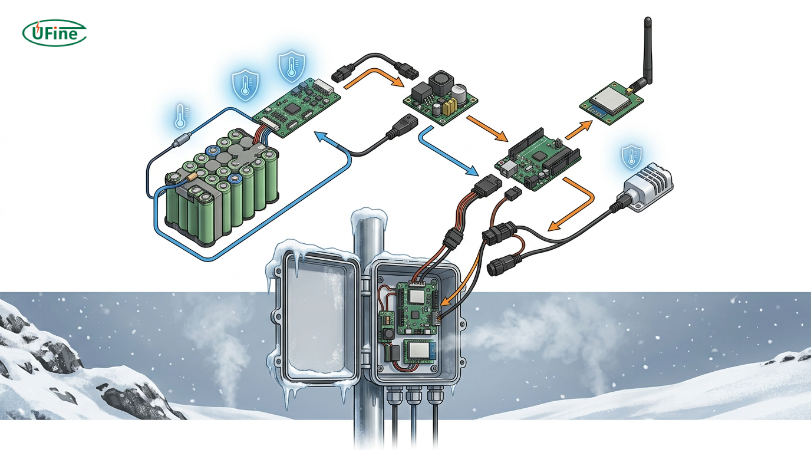
Imagine an outdoor sensor powered by a single lithium battery.
It measures temperature every five minutes and sends data through LoRa.
Everything works well during indoor testing at 25°C.
After deployment in winter, the device begins to reboot every time it transmits.
The battery reports nearly 70% capacity.
The firmware has no obvious errors.
This is a common sign that the battery voltage is collapsing during short, high-current events.
Why It Happens
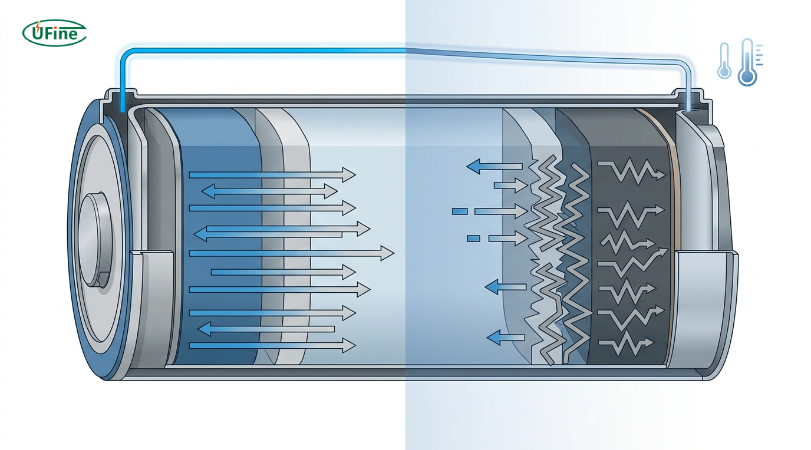
At low temperatures, lithium ions move more slowly inside the cell.
That causes:
- Higher internal resistance
- Lower discharge voltage
- Reduced available capacity
- Larger voltage drop during current spikes
For low-power sensors, this may not be noticeable.
For devices with radios, motors, cameras, or heaters, the voltage drop can become large enough to trigger a brownout reset.
Step 1: Measure Battery Temperature
Many battery-powered designs monitor only battery voltage.
Temperature is just as important.
A simple NTC thermistor connected to an ADC channel can provide enough information to protect the system.
Example firmware logic:
float batteryTemp = ReadBatteryTemperature();

if (batteryTemp < 0) {
    chargingEnabled = false;
}
Disabling charging below freezing helps prevent lithium plating and extends battery life.
Step 2: Log Voltage During Peak Current
Average battery voltage tells only part of the story.
Instead, record voltage while the highest-current load is active.
Typical examples include:
- LoRa transmission
- LTE connection
- Wi-Fi startup
- Motor startup
- LED flash
Many developers discover that the battery voltage briefly falls below the MCU operating limit even though the average voltage looks normal.
Capturing this event with an oscilloscope or high-speed ADC often reveals the real cause.
Step 3: Reduce Current Peaks
Sometimes the battery does not need to be replaced.
The power profile simply needs to be smoother.
Possible improvements include:
- Lower radio transmit power when possible
- Delay high-current loads after startup
- Increase capacitor size near the power rail
- Enable soft-start for motors
- Spread multiple high-power tasks over time
Even small reductions in peak current can noticeably improve stability in cold environments.
Step 4: Add Temperature-Aware Firmware
Instead of treating every operating condition the same, allow firmware to respond to temperature changes.
A simple state machine works well.
if (batteryTemp > 0) {
    radioPower = HIGH;
}
else if (batteryTemp > -10) {
    radioPower = MEDIUM;
}
else {
    radioPower = LOW;
    samplingInterval = 900;   // seconds
}
Reducing radio activity during very cold weather lowers the discharge rate and helps maintain system uptime.
Step 5: Choose the Right Battery
Software optimization has limits.
If the application must operate below freezing for long periods, battery selection becomes critical.
A standard lithium-ion battery may meet the capacity requirement but still struggle under low-temperature discharge.
A professional lithium battery manufacturer can provide battery packs designed for cold-weather applications using optimized electrolytes, application-specific BMS settings, and optional self-heating technology.
Selecting the right battery early in the design process is usually easier than redesigning the hardware later.
Hardware Design Checklist
Before deploying an outdoor device, check the following:
✓ Battery temperature sensor installed
✓ Brownout voltage configured correctly
✓ Peak current measured during radio transmission
✓ Bulk capacitor sized for transient loads
✓ Charging disabled below the recommended temperature
✓ Battery operating range verified for the deployment environment
A short checklist like this can prevent many field failures.
When a Larger Battery Is Not the Answer
Increasing battery capacity extends runtime, but it does not solve every low-temperature issue.
If voltage collapse is caused by high internal resistance, replacing a 2000 mAh battery with a 4000 mAh battery may produce only a small improvement.
Applications expected to work through winter often benefit more from batteries specifically designed for battery temperature low environments than from simply adding more capacity.
Battery Temperature Low FAQs
Why does my device reboot only in winter?
Low temperatures increase battery resistance. During high-current events such as radio transmission or motor startup, battery voltage may briefly fall below the MCU's operating voltage, causing a reset.
Should I monitor battery temperature or battery voltage?
Both are important. Voltage shows the battery's electrical state, while temperature helps explain why voltage may suddenly drop under load.
Can firmware improve cold-weather battery performance?
Yes. Firmware can reduce transmit power, increase sleep time, delay high-current tasks, and disable charging when temperatures are too low.
When should I use a low-temperature lithium battery?
Applications such as outdoor IoT sensors, security cameras, telecom equipment, and robotics that operate below 0°C are good candidates for low-temperature battery packs.
How does a lithium battery manufacturer improve batteries for cold environments?
A lithium battery manufacturer improves cold-weather performance by optimizing cell chemistry, electrolyte formulation, battery management algorithms, and thermal design to maintain stable operation at lower temperatures.