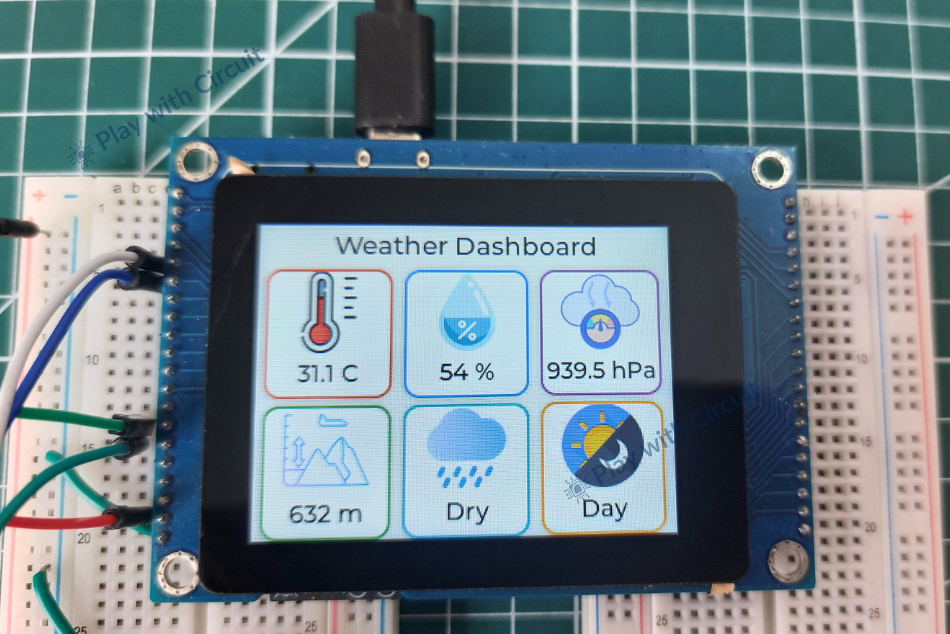
This project is a compact weather monitoring system built with an ESP32-S3 Smart Display and sensors. It uses a BME280 sensor to measure temperature, humidity, atmospheric pressure, and altitude, along with a rain sensor for rainfall detection and an LDR for day/night identification.
This project demonstrates a compact weather monitoring system built around a 2.8-inch ESP32-S3 Smart Display. The system collects environmental information from multiple sensors and presents the results through a touchscreen dashboard.
The setup measures temperature, humidity, atmospheric pressure, altitude, rainfall condition, and day/night status. Instead of using a separate ESP32 development board and display, the VIEWE ESP32-S3 Smart Display combines the processing unit and touchscreen in a single module.
A BME280 sensor is used for environmental measurements, while a rain sensor detects water and an LDR module monitors ambient light. The sensor readings are processed by the ESP32-S3 and displayed using the LVGL graphics library.
How the Weather Monitoring System Works?
The system continuously collects data from the connected sensors. The ESP32-S3 then processes these readings and converts them into useful information for the graphical interface.
The BME280 provides temperature, humidity, and atmospheric pressure measurements. The pressure information is also used for altitude calculation. Communication with the BME280 takes place through the I2C interface.
The rain sensor works by detecting changes in conductivity on its sensing plate. When water droplets come into contact with the conductive tracks, the sensor output changes. The ESP32-S3 reads this analog signal to determine whether the surface is dry or exposed to rainfall.
An LDR sensor is used for ambient light detection. Its resistance changes depending on the amount of light reaching its surface. Bright conditions result in lower resistance, while darker conditions produce higher resistance. The analog reading is then used to determine whether it is day or night.
The ESP32-S3 handles the complete data-processing stage. It reads the sensors, calculates altitude from pressure data, evaluates the rain and light sensor readings, and updates the information shown on the touchscreen.
Touchscreen Interface Using LVGL
The graphical interface is developed using LVGL (Light and Versatile Graphics Library). LVGL is designed for embedded devices and provides graphical elements such as labels, images, buttons, and other interface components.
In this project, LVGL is used to create the weather dashboard on the ESP32-S3 Smart Display. Sensor values are presented through labels and information cards, while weather icons provide a quick visual indication of the current conditions.
The dashboard is continuously refreshed as new sensor readings become available, allowing the display to function as a real-time environmental monitoring interface.
Hardware Required
The main controller and display for this project is the VIEWE 2.8-inch ESP32-S3 Smart Display. A 7Semi BME280 sensor is used to measure temperature, humidity, atmospheric pressure, and altitude.
A rain sensor is required to detect rainfall or water droplets, while an LDR/light sensor is used for ambient-light measurement and day/night detection.
For prototyping, jumper wires and two breadboards are used. A USB cable is required for connecting and programming the ESP32-S3 Smart Display.
Software Requirements
The project is developed using Visual Studio Code with the ESP-IDF extension. Visual Studio Code version 1.116.0 or newer is required, along with ESP-IDF extension version 1.11.1 or newer.
The project uses ESP-IDF v5.3.5 and Python v3.11.2. The Bosch BME280 library is included with the project source, and the LVGL display port uses LVGL v8.4.0.
When installing the required software, it is recommended to keep the default installation path provided by the installer.
Connecting the Sensors
Connecting the Sensors
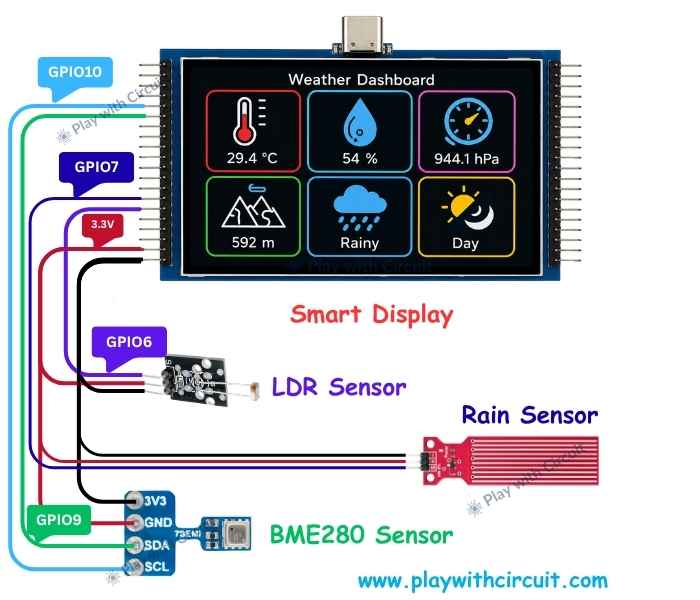
The BME280 uses the I2C interface and is connected to I2C_NUM_1 of the ESP32-S3. Its VCC pin is connected to 3.3V, GND is connected to the common ground, SDA is connected to GPIO9, and SCL is connected to GPIO10.
The rain sensor uses its analog output. Its VCC is connected to 3.3V and GND is connected to the common ground. The AO pin is connected to GPIO7, which is configured as an ADC input. The ESP32-S3 monitors the analog voltage to determine the rain condition.
The LDR module is also connected as an analog input. Its VCC goes to 3.3V and GND goes to the common ground. The AO output is connected to GPIO6. The software compares the measured value against predefined thresholds to determine whether the environment is considered day or night.
All three sensors receive their power from the 3.3V supply of the ESP32-S3 Smart Display, and their ground connections are tied to the display's common GND.
Sensor Data Processing
Once the system is powered, the ESP32-S3 starts collecting information from the connected sensors.
The BME280 supplies temperature, humidity, atmospheric pressure, and altitude data. The rain sensor provides the analog information required for rainfall detection, while the LDR supplies the ambient-light reading used for day/night detection.
The processed values are then passed to the LVGL interface. The touchscreen dashboard displays the information through numerical values, icons, and status indicators.
Getting the Project Source Code
The complete Weather Monitoring System source code is supplied as a ZIP package. The required ESP-IDF environment and dependencies should be installed before attempting to compile the project.
Download the complete source code
Opening the Project in Visual Studio Code
After extracting the downloaded ZIP file, navigate through the project folders until you reach the lvgl_v8_port directory.
The relevant structure is:
007_WeatherMonitoring
└── ESP32_Display_Panel
    └── examples
        └── esp_idf
            └── lvgl_v8_port
Open the lvgl_v8_port folder in Visual Studio Code so that the ESP-IDF extension can recognize the project.
Cleaning and Building
Before compiling the project, remove the existing build, managed_components, and dependencies.lock folders/files if they are present.
Next, use the ESP-IDF controls in the VS Code status bar to clean the project and start a fresh build. Wait for the compilation process to finish.
If the ESP-IDF extension does not automatically identify the required configuration, manually select the ESP32-S3 target, the appropriate serial COM port, and the correct ESP-IDF toolchain.
Flashing the Firmware
Once the project has compiled successfully, connect the ESP32-S3 Smart Display to the computer using a USB Type-C cable.
Select the Flash Device option from the ESP-IDF toolbar and wait until the firmware upload is completed. After a successful flash, the weather monitoring dashboard should start running on the smart display.
Understanding the Project Files
Although the complete ESP-IDF project contains many framework, driver, and library files, the application-specific code is mainly located in the main directory.
The main.cpp file is responsible for initializing the ESP32-S3 Smart Display and setting up the LVGL interface. It also initializes the BME280, configures the ADC inputs for the rain and LDR sensors, reads the environmental measurements, determines rain and day/night conditions, and updates the graphical dashboard.
The sensors.c file contains the sensor-related functions. It handles BME280 readings, temperature and humidity measurements, atmospheric pressure, altitude calculation, rain sensor readings, and LDR readings. It also determines the rain and day/night status before providing the processed values to the graphical interface.
Separating these functions makes the project easier to organize because the sensor acquisition routines remain independent from the main display and application logic.
Final Output
After the hardware is connected and the firmware is flashed, the ESP32-S3 Smart Display becomes a standalone touchscreen weather monitoring unit. It gathers environmental data from the BME280, rain sensor, and LDR and presents the processed information through an LVGL-based dashboard.
The project provides practical experience with ESP32-S3, ESP-IDF, I2C communication, ADC-based sensors, environmental monitoring, and LVGL GUI development.
For the complete implementation and additional project details, visit the original project documentation on Play with Circuit.