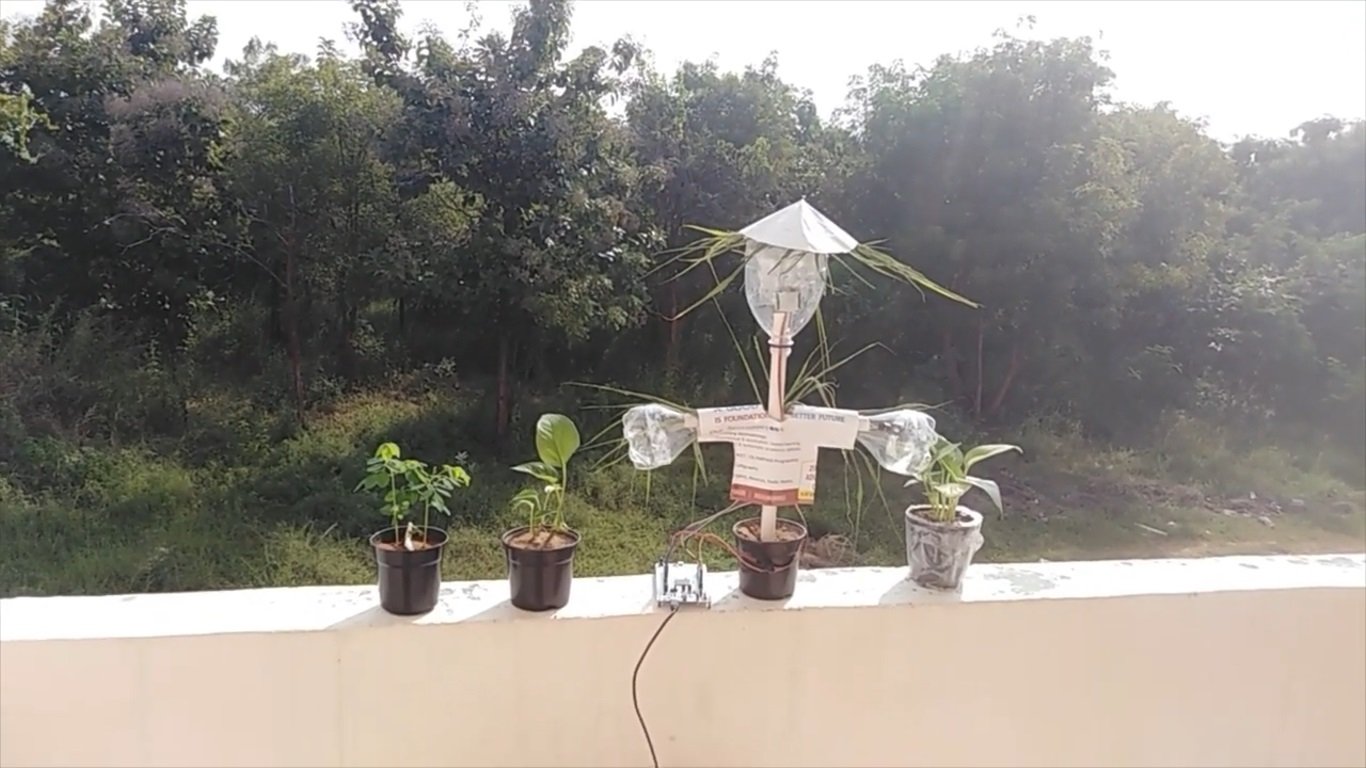
Scarecrows are used around the world by farmers, and are a notable symbol of farms and the countryside in popular culture. A scarecrow is placed in open fields to discourage birds and animals from disturbing and feeding on recently cast seed and growing crops.
Abstract:
Scarecrows guard fields around the world during the growing season. Today some farmers use technological scarecrows instead of straw and wooden figures, technological scarecrows like reflective film ribbons tied to plants to create shimmers from the sun or automatic sound generators. But still their is need to advance them for farmers. In this present project I am planning to design “AI Smart Scarecrow for farmers". As the design hardware FRDM-MCXN947 featuring the MCX N Series has the ability to create more advance scarecrow.
Scarecrow with Digital and AI for farmers
Hardware:
MCX N Series Microcontrollers
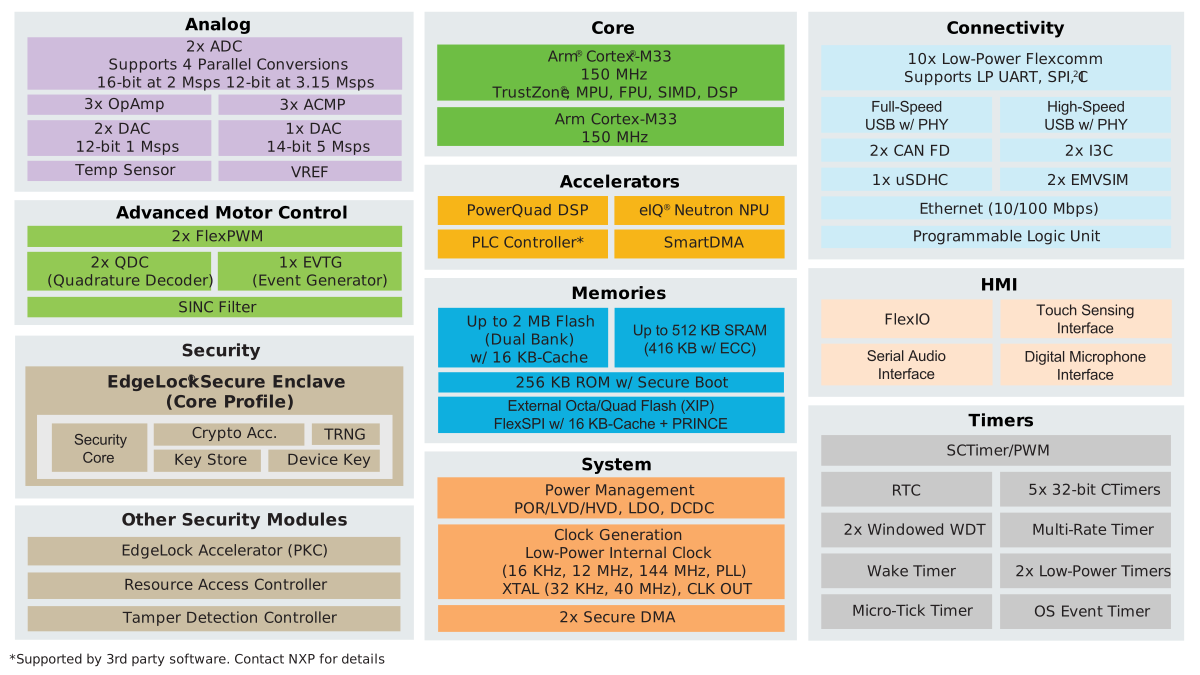
MCX N series of highly integrated Arm Cortex-M33 microcontrollers are designed for high performance and low power consumption. MCX N includes intelligent peripherals and on-chip accelerators providing multitasking capabilities and performance efficiency. The MCX N94x is based on dual high-performance Arm® Cortex®-M33 cores running up to 150 MHz, with 2MB of Flash with optional full ECC RAM, a DSP co-processor and an integrated eIQ Neutron NPU. The NPU delivers up to 42x faster machine learning throughput compared to a CPU core alone enabling it to spend less time awake and reducing overall power consumption. The multicore design delivers improved system performance and reduces consumption by enabling smart, efficient distribution of workloads to the analog and digital peripherals. The device is supported by the MCUXpresso Developer Experience to optimize, ease and help accelerate embedded system development. The MCX N94x offers a wider set of analog and motor control peripherals.
Block Diagram Supporting features on the MCX N94x MCUs
Applications
Industrial
- Brushless DC Motor (BLDC) Control
- Industrial HMI
- Mobile Robotics Ecosystem
- Motion Control and Robotics
- Motor Drives
- Permanent Magnet Synchronous Motor (PMSM)
- Smart Lighting
- Smart Power Socket and Light Switch
Smart Home
- Gaming Accessories
- Home Control Panel
- Home Security and Surveillance
- Major Home Appliances
- Robotic Appliance
- Smart Speaker
- Soundbar
Software:
Step 1: Download and Install required Software(s)
- Download MCUXpresso IDE v11.9.0 and Install following the installer instructions.
- Download MCXUpresso SDK 2.14.0 for FRDM-MCXN947. Make sure to select ISSDK middleware while building SDK. Make sure to change version to 2.14.00 and build SDK for MCUXpresso IDE.
- Install Git v2.39.0 (for cloning and running west commands)
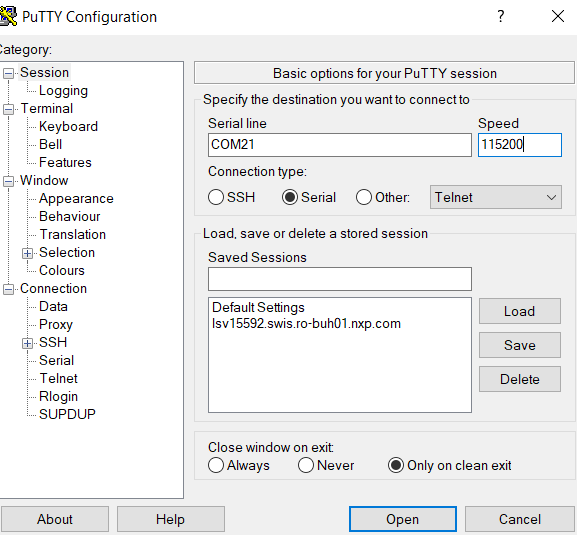
- Install Putty/Teraterm for UART.
Step 2: Build project
- Open MCUXpresso IDE and select a directory to create your workspace.
- Install MCXUpresso SDK 2.14.x for FRDM-MCX947 (drag and drop SDK zip into "Installed SDK" view) into MCUXpresso IDE.
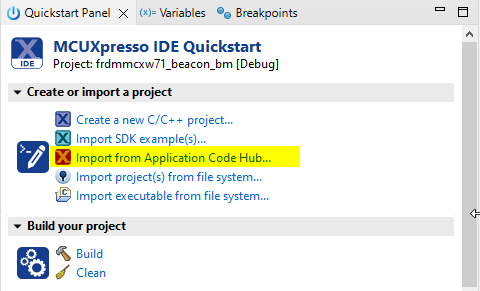
- Go to "Quickstart Panel" and click on "Import Project(s) from file system",
- Select "Project directory (unpacked)" and browse to the cloned project folder.
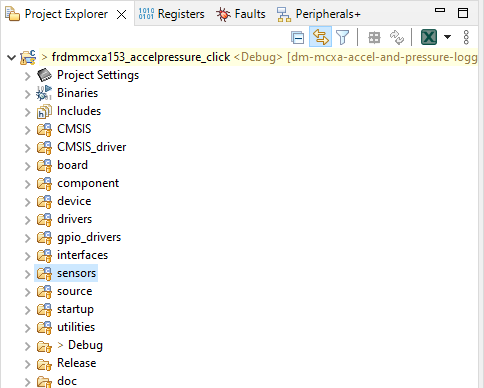
- Select example projects that you want to open and run.
- Right click on project and select build to start building the project.
Getting Started with FRDM-MCXN947
Step-by-step hardware using and Software installing & programming are provided in the following URL https://www.nxp.com/document/guide/getting-started-with-frdm-mcxn947:GS-FRDM-MCXNXX?
APPLICATIONS that can run on FRDM MCXN947:
Application example are available in code hub and few are shown below which were using in the present project.
1) Multiple Person Detection on MCXN947
Multiple-person detection based on the machine learning algorithm, powered by MCXN947
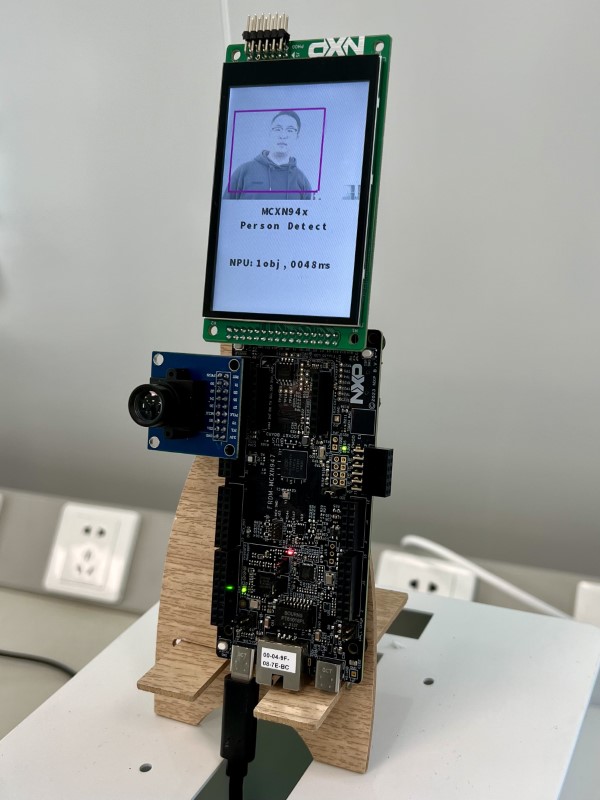
For more details can follow the following URL https://mcuxpresso.nxp.com/appcodehub?search=dm-multiple-person-detection-on-mcxn947
2) Label CIFAR10 image on FRDM-MCXN947
This example is based on the machine learning algorithm, powered by MCXN947, which can label the images from the camera and show the type of the object at the bottom of the LCD. The model is trained on dataset CIFAR10, it supports 10 classes of images: "airplane", "automobile", "bird", "cat", "deer", "dog", "frog", "horse", "ship", "truck". The preview of camera is showing in the top of LCD, Show a bird picture to the camera, the type of object is showing at the bottom of the LCD.
 https://mcuxpresso.nxp.com/appcodehub?search=dm-label-cifar10-images-on-mcxn947
2) PCA9959HN led driver running on FRDM-MCXN947
PCA9959 is a daisy-chain SPI-compatible 4-wire serial bus controlled 24-channel constant preset current LED driver, optimized for dimming and blinking 63 mA Red/ Green/Blue/Amber (RGBA) LEDs.
https://mcuxpresso.nxp.com/appcodehub?search=dm-pca9959hn-led-driver-with-demo-app
3) Implement USB audio 7.1 channel speaker on MCXN947
This will show you how to implement a USB audio 7.1 channel speaker on MCXN947.
https://mcuxpresso.nxp.com/appcodehub?search=dm-usb-audio-7-1-channel-speaker-on-mcxn947
4) Magnetic Wake-up Example using NMH1000 Magnetic Switch Sensor
This describes how to configure NMH1000 magnetic switch sensor to enable magnetic wake-up use-case. Such use-case can find many applications where user would like to completely shut off power supply or put the device in power down mode etc. based on magnetic field applied. Examples include, smart meters, shelf labels, reed switch replacement, smart home etc. Connect the chosen project HWs: FRDM-MCXN947 with Hall Switch 3 click board
https://mcuxpresso.nxp.com/appcodehub?search=dm-nmh1000-magnetic-switch-example
5) Pressure and Altimeter Examples using MPL3115 Sensor
This describes how to configure absolute pressure sensor MPL3115 for pressure and altimeter mode. This sensor can find use in many industrial, medical applications.
https://mcuxpresso.nxp.com/appcodehub?search=dm-mpl3115-pressure-altimeter-examples
Project Steps:
The following steps are provided to interface the suitable sensors and actuators to the FRDM-MCXN947 evaluation kit and the purpose for interfacing them in the current project.
1) The Smart Camera header is used to interface the camera module OV7670 or OV5645 through which the scarecrow can identify which disturbing creature is entering into the field. The AI can be perform with Neural processing unit which available on the FRDM-MCXN947 kit to detect the persons or animals or birds moving in the fields.
2) The RGB LEDs are used as one method to scare the animals, birds or other small creatures because each color will scare different creatures. The RGB LED driver is interfaced with Arduino Header pins of FRDM-MCXN947 kit. PCA9957 is a daisy-chain SPI-compatible 4-wire serial bus controlled 24-channel constant preset current LED driver, optimized for dimming and blinking 63 mA Red/ Green/Blue/Amber (RGBA) LEDs.
3) A sound recorder and playback module like MikroBUS speakup click can be used to listen sound and generate audio when the camera loss visibility during fog conditions. The FRDM-MCXN947 kit has on-board MikroBus connector to interface any kind of click boards.
4) A buzzer can also used to produce beep sound which can be interfaced to GPIO pins of FRDM-MCXN947 kit. Different tones can be produced on detecting different animals and birds from the Camera module and NPU.
5) Servo motor is interfaced to produce the movement of scarecrow to get the feeling that person moving. It make 180 deg angle rotation based on the PWM signal from the GPIO pin of FRDM-MCXN947 kit.
6) NXP sensors FXLS8974CF (3-axis accelerometer) and MPL3115 (absolute pressure) with FRDM-MCXN947 platform are used to monitor the win breeze effect on crop. Both sensors share the I2C bus for digital communication with the MCXN947.
7) Accurate temperature sensor P3T1085UK for temperature measurement. This sensor can be used to monitor the temperature of air in the fields.
8) NMH1000 is an ultra-low power monolithic Hall effect magnetic field sensor that provides a small footprint in low-current and low-operating-voltage, I2C mode or standalone mode. This magnetic switch sensor triggers an output when surrounding magnetic field is greater than the user-defined detection threshold. It can find the motion of servo motor to point the direction of movement.
9) The LCD-PAR-S035 is a 3.5” 480x320 IPS TFT LCD module with wide viewing angle and 5-point capacitive touch functionality. The LCD module can be controlled through either SPI or parallel with a PMOD connector as well as selected FRDM-MCXN947 evaluation kits with a parallel LCD connector.
10) Ambient light Sensor TEMT6000 or OPT3001DNPT has photodetector to sense the amount of light present based on its value the FRDM-MCXN947
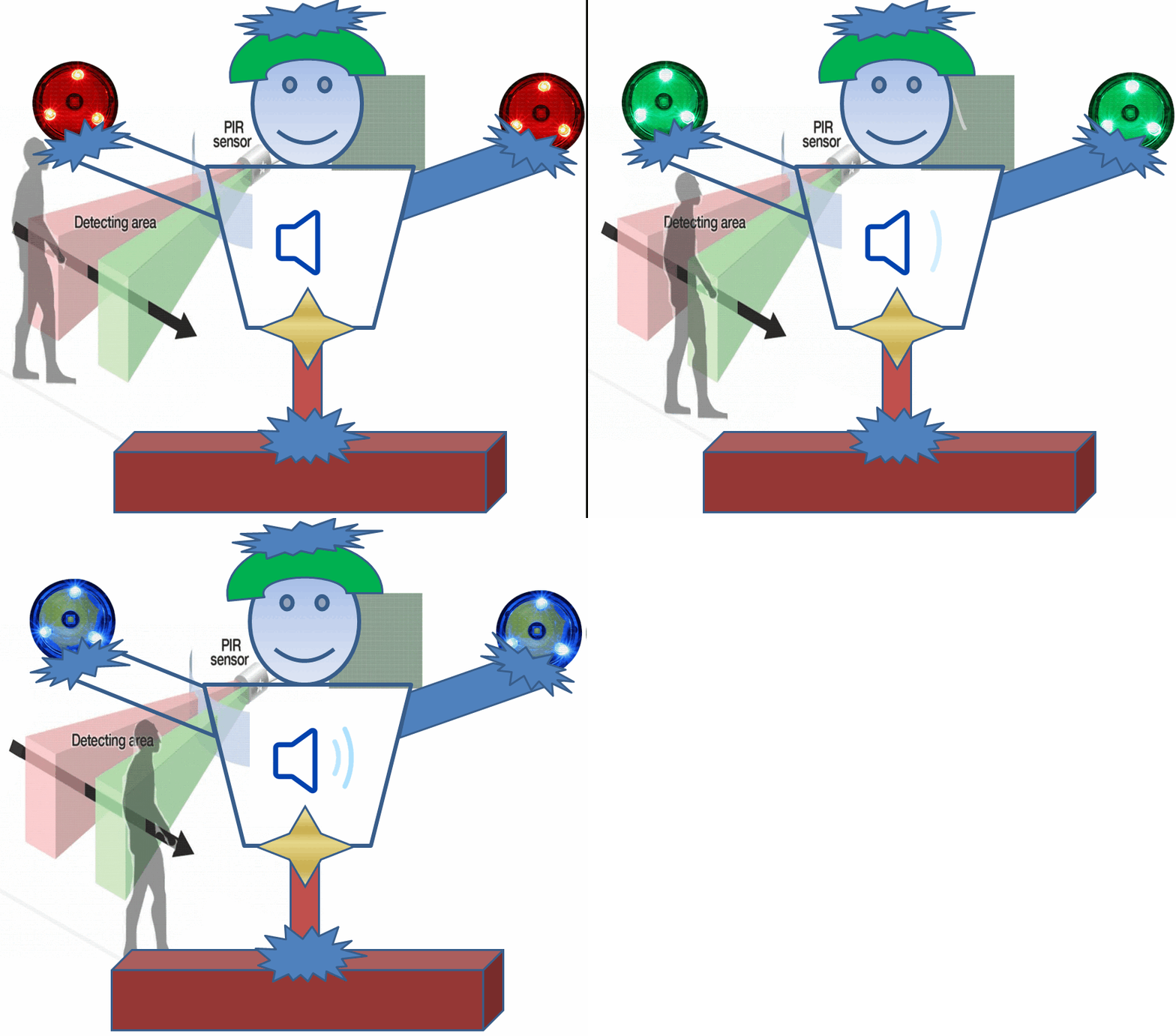
11) PIR Motion Sensor Detector Module HC SR501 allow you to sense motion, almost always used to detect whether a human or animals has moved in or out of the sensors range. It is interfaced to the FRDM-MCXN947 evaluation kit GPIO pins to output the signal to monitor the presence of moving creature.
Concept Diagram with Hardware :

Flowchart for process:

Software images:
1) Create or import project:
2) Choose example to run the application
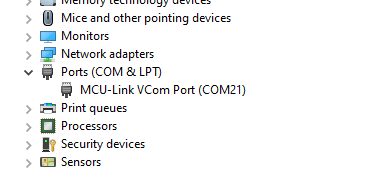
3) Monitor the results when application runs successfully, you can see the logs printed on the terminal by configuring the serial UART Port.
output result on terminal
4) Build the project, after compile complete, use the GUI Flash Tool (2 in the following figure) to write the program to the board.
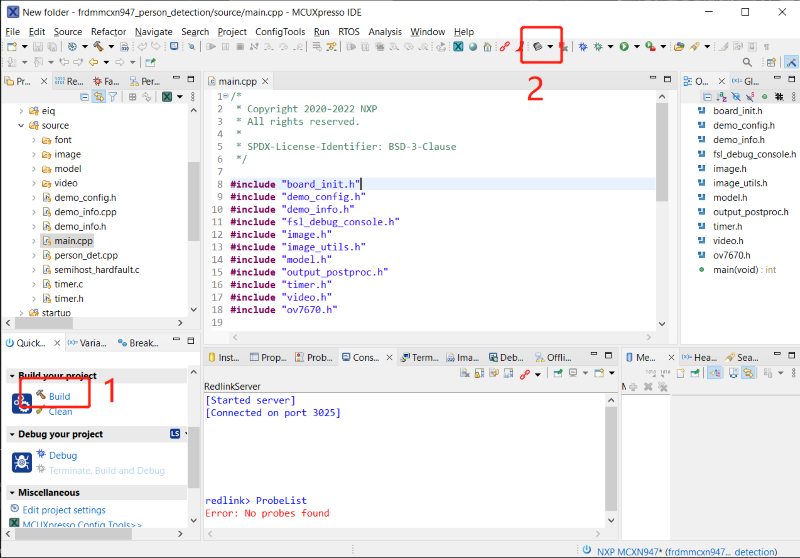
Once all the hardware interfacing are completed then program is developed in MCUXpresso IDE and is loaded onto FRDM-MCXN947 board to run the Digital Scarecrow process.
Code for scarecrow to detect humans or objects in fields
  /*
 * Copyright 2020-2022 NXP
 * All rights reserved.
 *
 * SPDX-License-Identifier: BSD-3-Clause
 */

#include "board_init.h"
#include "demo_config.h"
#include "demo_info.h"
#include "fsl_debug_console.h"
#include "image.h"
#include "image_utils.h"
#include "model.h"
#include "output_postproc.h"
#include "timer.h"
#include "video.h"
#include "ov7670.h"

int main(void)
{
    BOARD_Init();
    TIMER_Init();


    DEMO_PrintInfo();


    Ov7670_Init();

    display_init();

    ezh_start();

    cifar10_recognize();

    delay(10000);

     person_det();

    while(1)
    {

    }
}
Conclusion:
This kind of scarecrow help for farmers and other locations where monkeys, dogs, wild boars, etc animals or birds causing the spoil. They even can place at the historical monuments, temple shrines, temple gopuras, status where birds will poop. The digital scarecrow will identify the species entering into the fields so that suitable alert will be generated to scare the animals, birds, humans. The identification can be done with the FRDM-MCXN947 evaluation kit as it has the NPU to detect and process to produce AI response.