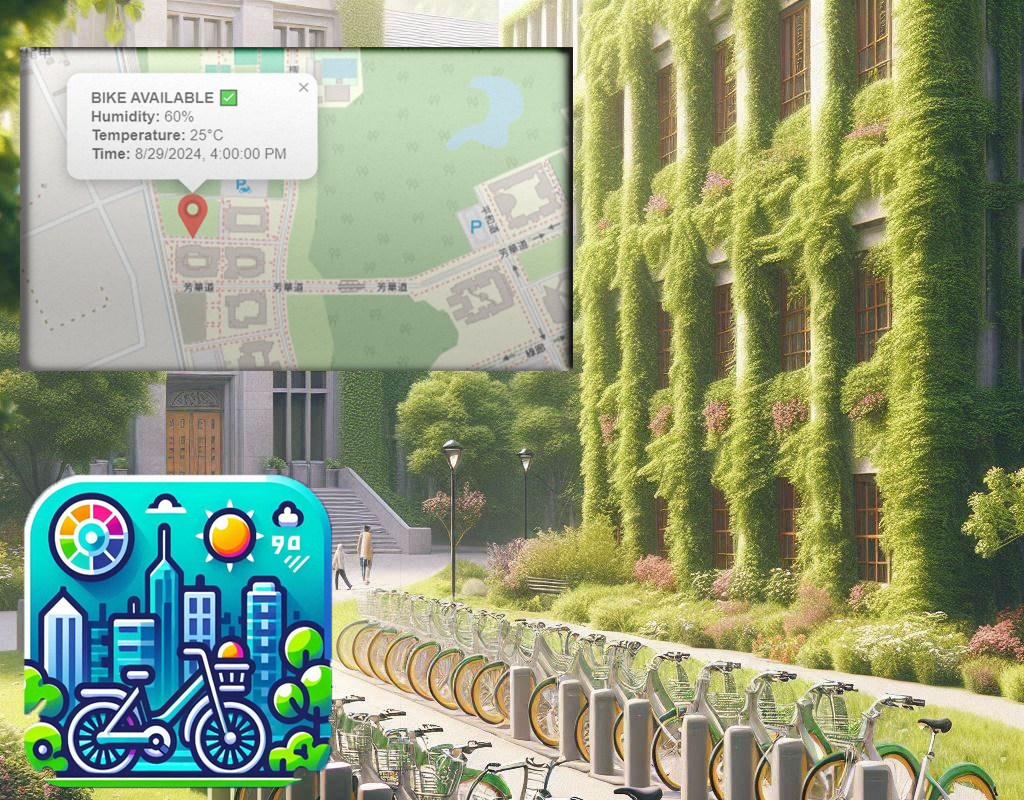
This is a bike sharing system based of the FRDM-MCXN947.
It uses a serverless architecture that will allow efficient bike renting and weather measuring that in app that allows users to rent bicycles and get updates on the real weather on specific spots around campuses, cities, and any open area that would allow it.
General Architecture
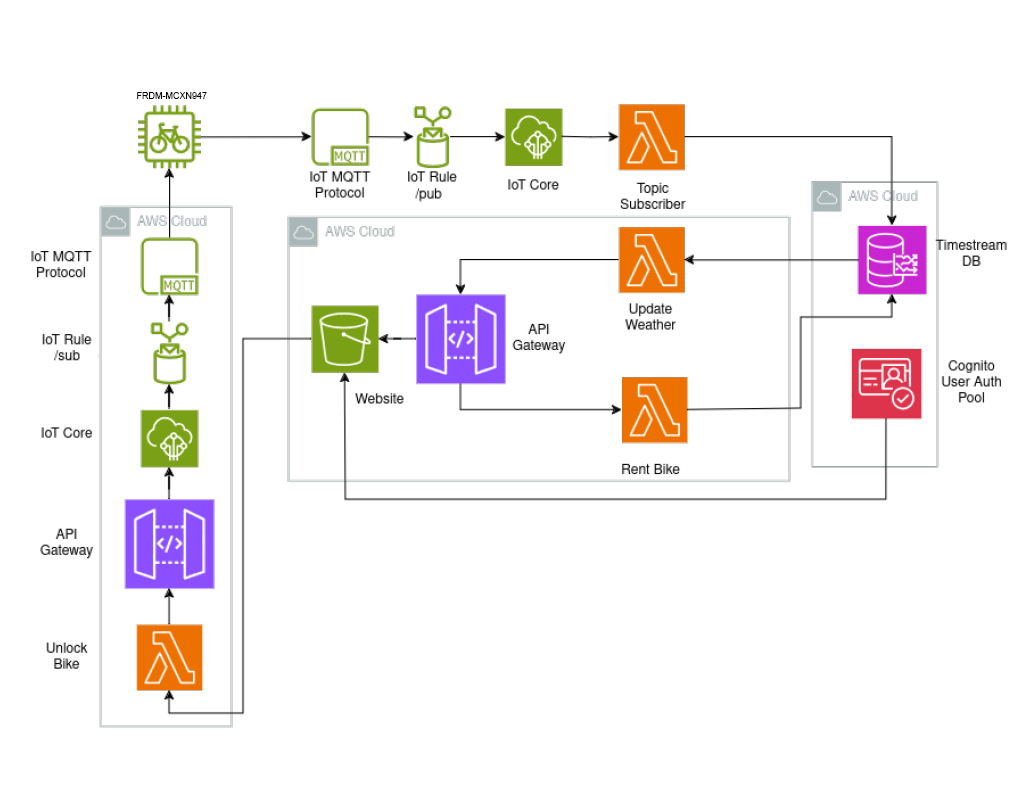
The project is divided in two parts, the stations itself that we will call Pagodas, which contain a FRDM-MCXN947 and all the needed peripherals to unlock the bikes, keep track of availability of the bikes and other features and the our backend stack that will be deployed on AWS.
Top-down view of the architecture
The architecture’s cornerstone is the utilization of IoT Core service from AWS, this allows us to connect our microcontroller and it’s peripherals to the internet.
We will separate the architecture in three parts
1. IoT Communication
2. Lambda Functions and API Gateways
3. Authentication, Storage and Website
IoT Communication
MQTT
I used the MQTT protocol, which is a lightweight messaging protocol designed for small sensors and mobile devices on low-bandwidth, high latency, or unreliable networks. It operates on a publish/subscribe model, where devices (clients) communicate through a central broker. The MQTT protocol is particularly well-suited for IoT (Internet of Things) applications due to its low power and bandwidth requirements. It uses a minimal
packet structure, which includes a fixed header of just 2 bytes, ensuring that the communication overhead is kept to a minimum.
AWS IoT Core
AWS IoT Core is a managed cloud service that enables connected devices to interact with cloud applications and other devices. AWS IoT Core provides the infrastructure needed to build IoT applications, including connectivity, device management, and message brokering.
Publish/Subscribe
In the context of AWS IoT Core, the publish/subscribe (pub/sub) model is a powerful mechanism for communication between devices and cloud applications. When a device publishes a message to a topic, AWS IoT Core delivers that message to all clients subscribed to that topic.
{
    "temperature": 23.5,
    "timestamp": "2024-06-19T12:00:00Z"
}
Lambda Functions and API Gateways
AWS Lambda Functions
AWS Lambda is a serverless compute service that allows you to run code without provisioning or managing servers. You can execute your code in response to events such as changes in data, shifts in system state, or user actions.
API Gateway
AWS API Gateway is a managed service that enables developers to create, publish, maintain, monitor, and secure APIs at any scale. It provides a way to expose AWS Lambda functions as RESTful APIs, this will come in handy when updated our website.
In my case (and also as seen on the the top-down view) I designed multiple Lambda functions:
1. A Lambda function that publishes data from the IoT Core to the Timestream database. This function does not require an API Gateway.
2. Several Lambda functions that handle various tasks:
- One Lambda function retrieves and updates weather data from the Timestream database.
- Another Lambda function updates the state of the bicycle (e.g., whether it is rented or not).
- A Lambda function to physically unlock or lock the bicycles. This function communicates with the IoT device via IoT Core and MQTT, instructing the device to lock or unlock.
Below are the Lambda functions on Python.
#Lambda Function to Retrieve Weather Data from Timestream Database
import json
import boto3
from botocore.exceptions import ClientError

timestream = boto3.client('timestream-query')

def lambda_handler(event, context):


    query = """
    select * from ------------------ where time between

    ago(1m) and now() ORDER BY time DESC LIMIT 1
    """

    try:
        response = timestream.query(QueryString=query)
        rows = response['Rows']
        data = []

        for row in rows:
            datum = {column['Name']: datum['ScalarValue'] for

            column, datum in zip(response['ColumnInfo'], row['Data'])}
            data.append({
                'location': datum['location'],
                'measure_name': datum['measure_name'],
                'measure_value': datum['measure_value::varchar'],  # Directly use the measure_value as string
                'time': datum['time']
            })

        return {
            'statusCode': 200,
            'body': json.dumps(data),
            'headers': {
                'Content-Type': 'application/json',
                'Access-Control-Allow-Origin': '*'
            }
        }
    except ClientError as e:
        print(e)
        return {
            'statusCode': 500,
            'body': json.dumps({'error': str(e)})
        }
#Update Bicycle State

import boto3
import json

dynamodb = boto3.resource('-----')
table = dynamodb.Table('------')

def lambda_handler(event, context):
    bike_id = event['bike_id']
    new_state = event['new_state']

    response = table.update_item(
        Key={'bike_id': bike_id},
        UpdateExpression="set bike_state=:s",
        ExpressionAttributeValues={':s': new_state},
        ReturnValues="UPDATED_NEW"
    )

    return {
        'statusCode': 200,
        'body': json.dumps('Bicycle state updated successfully!')
    }
#Lambda Function to Unlock/Lock Bicycles via IoT Core
import boto3
import json

iot_client = boto3.client('-----')

def lambda_handler(event, context):
    bike_id = event['bike_id']
    action = event['action']  # 'unlock' or 'lock'

    topic = f"bikes/{bike_id}/control"
    message = json.dumps({'action': action})

    response = iot_client.publish(
        topic=topic,
        qos=1,
        payload=message
    )

    return {
        'statusCode': 200,
        'body': json.dumps(f'Bicycle {action} command sent successfully!')
    }
Authentication, Storage and Website
Amazon Cognito
Amazon Cognito is a service provided by AWS that facilitates adding user signup, sign-in, and access control to your web and mobile applications quickly and easily. It supports sign-in through social identity providers such as Facebook, Google, and Amazon.
Storing Data in Amazon Timestream
Amazon Timestream is a fast, scalable, and serverless time-series database service for IoT and operational applications. It is optimized to store and analyze time-series data, making it an ideal choice for storing sensor data from IoT devices.
Website
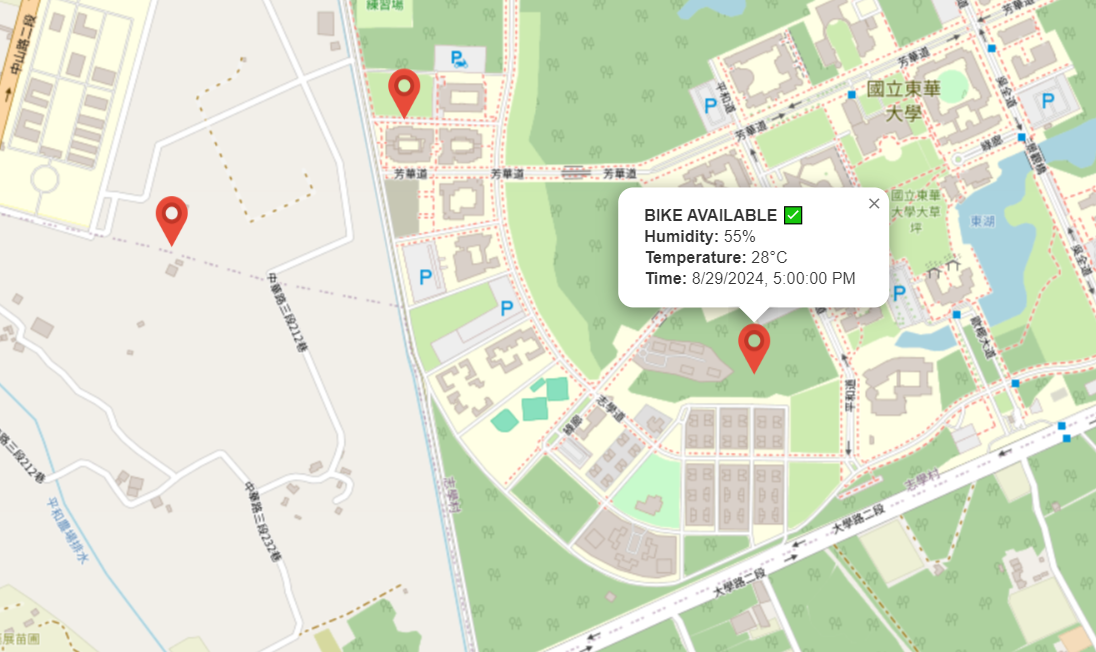
I designed the website using JavaScript with the React framework, which gives us a ton of flexibility and makes the app super responsive. For the map, I went with Leaflet, an open-source JavaScript library that's perfect for interactive maps. It’s lightweight, easy to use, and fits perfectly with the rest of our stack.
One of the best things about this setup is that we don't need to rewrite the app whenever we want to add more devices or expand the system. I just do calls to the database through the API gateway where I get the most recent updates of each station and aggregate them appropriately on the website.
import React, { useEffect, useState } from 'react';
import { MapContainer, TileLayer, Marker, Popup } from 'react-leaflet';
import L from 'leaflet';
import 'leaflet/dist/leaflet.css';
import iconUrl from './icon.png'; // Import the icon image
const myIcon = L.icon({
iconUrl: iconUrl,
iconSize: [25, 41],
iconAnchor: [12.5, 41],
popupAnchor: [0, -41],
});
const MapComponent = () => {
const [markers, setMarkers] = useState([]);
useEffect(() => {
// Fetch markers from your AWS API Gateway endpoint
fetch('-------------------------')
.then(response => response.json())
.then(data => {
const parsedData = data.map(item => ({
location: item.location,
measureName: item.measure_name,
measureValue: JSON.parse(item.measure_value), // Parse the JSON string
time: item.time,
}));
setMarkers(parsedData);
})
.catch(error => console.error('Error fetching data:', error));
}, []);
return (
<MapContainer center={[23.893, 121.535]} zoom={13} style={{ height: "100vh", width: "100%" }}>
<TileLayer
url="https://{s}.tile.openstreetmap.org/{z}/{x}/{y}.png"
attribution='© <a href="https://www.openstreetmap.org/copyright">OpenStreetMap</a> contributors'
/>
{markers.map((marker, index) => {
const [lat, lon] = marker.location.split('/').map(coord => parseFloat(coord.trim()));
return (
<Marker key={index} position={[lat, lon]} icon={myIcon}>
<Popup>
<div>
<strong>BIKE AVAILABLE ✅</strong><br/>
<strong>Humidty:</strong> {marker.measureValue.humidity}<br />
<strong>Temperature:</strong> {marker.measureValue.temperature}<br />
<strong>Time:</strong> {new Date(marker.time).toLocaleString()}
</div>
</Popup>
</Marker>
);
})}
</MapContainer>
);
};
export default MapComponent;
The benefits of using the FRDM-MCXN947 in my project
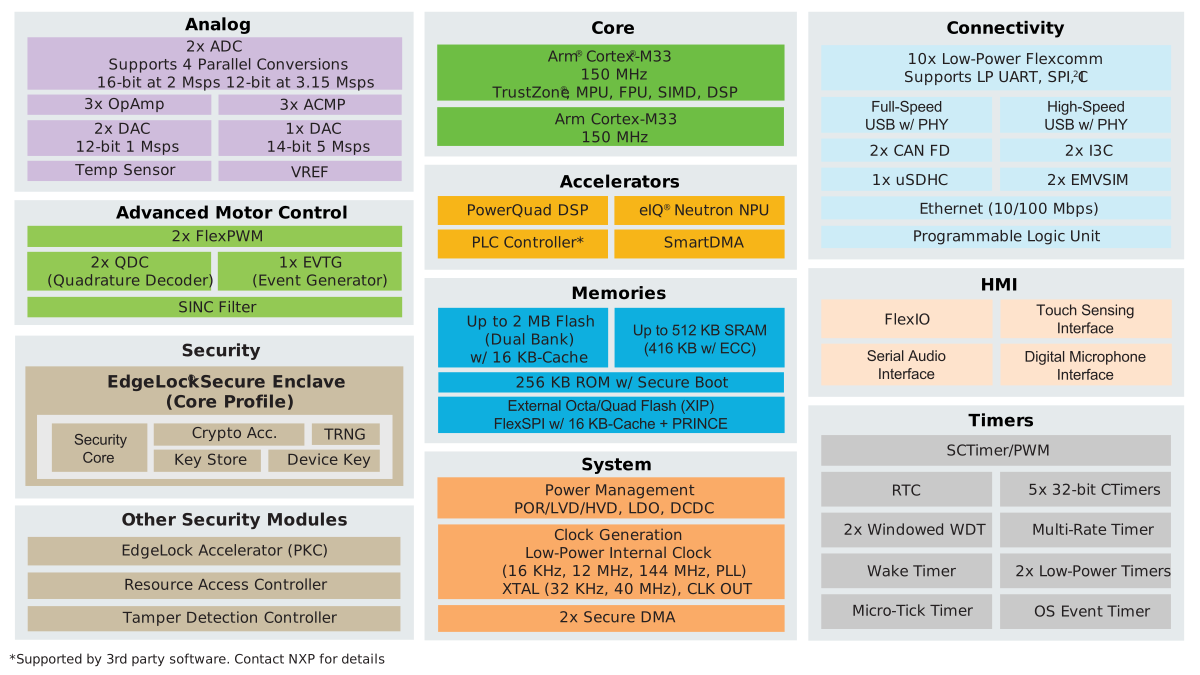
I structured the project around the FRDM-MCXN947 because it just fit perfectly with what we needed. Straight out of the box, it offered a bunch of peripherals that were ideal for our project. It’s packed with safety features, which is a huge plus, and with so many examples available online, getting everything up and running was a breeze. The low power consumption and friendly programming environment made it super easy to scale.
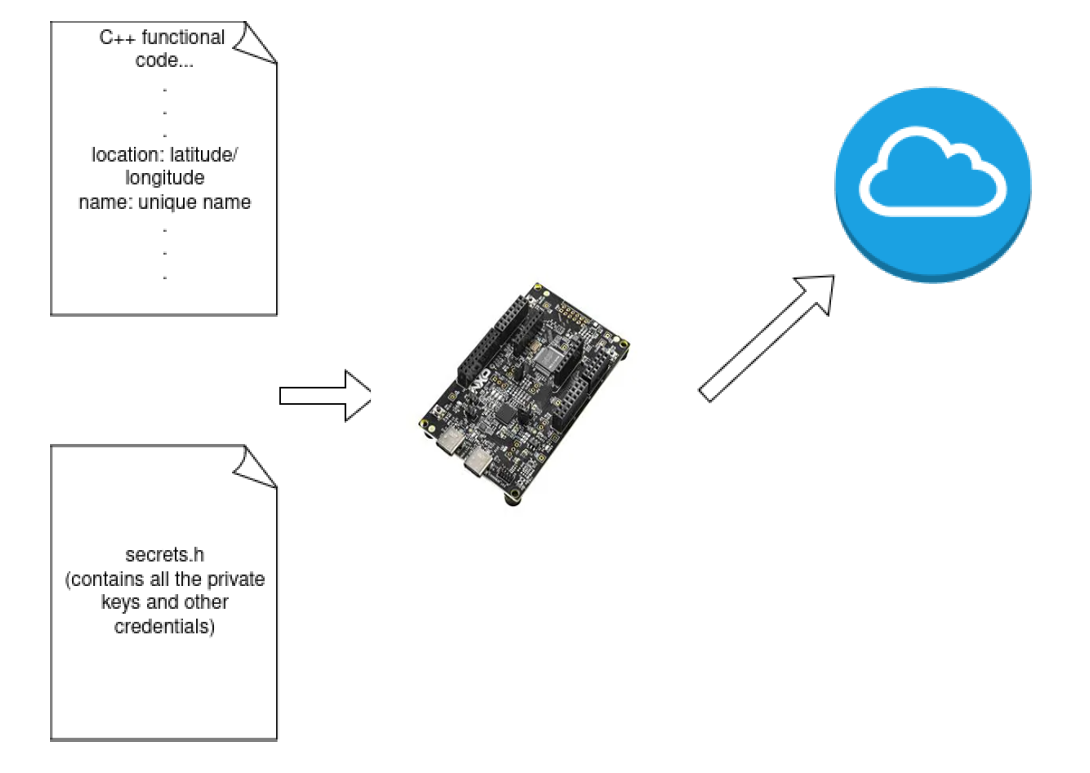
For instance, in our project adding a new station to the system only requires us to generate a name and credentials for it on AWS and then we just slap the credentials into our devices.
The code remains identical for all FRDM-MCXN947 except for some headers containing the credentials.
Safety features
A big oversight many times present on IoT projects is the lack of security measures since many low-power devices have a difficult time implementing proper safety measures. The FRDM-MCXN947 comes with EdgeLock® Secure Enclave, a conjunction of multiple safety features on-die that allows me to add the feature while having piece of mind because of safety policies it let me set up on its programming enviorment. This is crucial for IoT applications, especially something like a bike-sharing app that's out in the wild and exposed to risks. With features like advanced tamper detection and intelligent power management, it ensures that our system stays secure.
One that stood up was the Voltage Tamper Detect and the Active and Passive Tamper Pin detection, our stations have exposed sensors that could be forcefully damaged or removed to inject specific payloads that could compromise both the device and possibly even the servers. This is often an issue that IoT devices have but the FRDM-MCXN947 has so many safety features at such a reasonable price point.
Remember, your are as strong as your weakest link.
Availability and on board features
The FRDM-MCXN947 is budget-friendly and packed with features, like Ethernet and Pmod connections, giving us the flexibility to connect to either an Ethernet or Wi-Fi hub, depending on what we need. Plus, it comes with a great programming environment and makes configuring safety features a breeze.
Also this project only makes use of a temperature sensor, however both this project and the FRDM-MCXN947 can easily connect and integrate multiple sensors and peripherals at the same time without having to completely restructuring either one of them.
Conclusion and final thoughts
In conclusion, the this project represents a robust, safe, and reliable system that leverages the fundamentals of distributed systems and IoT to create a powerful urban infrastructure solution. By integratingFRDM-MCXN947-based Pagodas equipped with sensors and peripherals, the system establishes a seamless network for real-time monitoring and control.
The architecture of the system, built upon AWS IoT Core and serverless computing with Lambda functions, ensures scalability and efficiency in handling data from multiple Pagodas distributed across urban environments. This design not only enhances user experience by providing accurate weather updates and convenient bike rentals but also demonstrates the practical application of IoT using the FRDM-MCXN947 in urban mobility and environmental monitoring.
Furthermore, the data collected by the units holds immense potential beyond its immediate functionalities. The network of Pagodas acts as a distributed system of microscopic weather stations, generating vast datasets that can be utilized to train AI models for highly detailed weather forecasting and climate modeling.
Because of time constrains, this last part couldn't be implemented, however the FRDM-MCXN947 have AI acceleration, so it could be interesting to see more features added and maybe have inference on the edge.
Hit me up if you are interested on following the project :).