What the Software will Do?
The following are major software features critical to the functionality of the device:
Steady-State Infusion: The software will regulate and maintain a continuous, controlled flow rate to ensure that the patient receives a consistent amount of fluid or medication over a specified period.
Bolus: The software will facilitate the rapid delivery of a set volume of fluid or medication at the push of a on-screen button, typically used for immediate therapeutic needs.
Monitoring: It will constantly monitor the infusion process, checking for any discrepancies such as blockages, air bubbles, or deviations from the prescribed infusion rate.
Drug Library: The software will house a comprehensive drug library, which will store information on various medications, their recommended dosages, contraindications, and other vital data to aid in the accurate and safe administration of drugs.
History Logs of the Pump: The software will maintain comprehensive history logs for the pump, capturing every action, infusion session, and alert.
This functionality is crucial for:
Traceability: Ensuring every infusion session is documented, allowing healthcare professionals to trace back through the patient’s treatment history.
Audit & Compliance: Meeting regulatory requirements by maintaining a detailed record of pump usage, ensuring adherence to clinical standards.
Device Maintenance: Tracking usage patterns to schedule timely maintenance, calibrations, or replacements, ensuring the pump operates at peak efficiency.
Functional Boundaries
The IPCS will be in charge of:
Initiation and termination of fluid infusion.
Regulation of infusion flow rate and volume, ensuring precise delivery of fluids at the prescribed rates. Detection and reporting of obstructions or malfunctions within the pump mechanism.
Calibration and self-testing processes to ensure the pump’s continued accuracy and reliability.
Logging and storing of infusion history, any detected issues, and user interactions.
User interface management, allowing medical professionals to input instructions, view system status, and receive alerts. Integration capabilities with hospital information systems, if necessary, for real-time data sharing and synchronization.
Software updates via a computer connection.
Operational Boundaries
While the IPCS is integral to the infusion pump’s operations, it does not:
Physically maintain or repair the infusion pump’s hardware components. The software will alert users to issues, but cannot resolve hardware malfunctions.
Directly interface with other medical devices outside of its designed integration protocols.
Replace the need for regular manual checks and oversight by medical professionals. Instead, it helps them ensure the safe and effective delivery of fluids.
User Interactions
The software provides a user-friendly interface, designed for healthcare professionals to:
Input infusion parameters, such as flow rate and total volume to be infused.
Receive real-time feedback on the current status of the infusion.
Acknowledge and address system alerts and warnings.
Access and review logs and historical data related to past infusions.
Change device settings such as alarm limits and screen brightness.
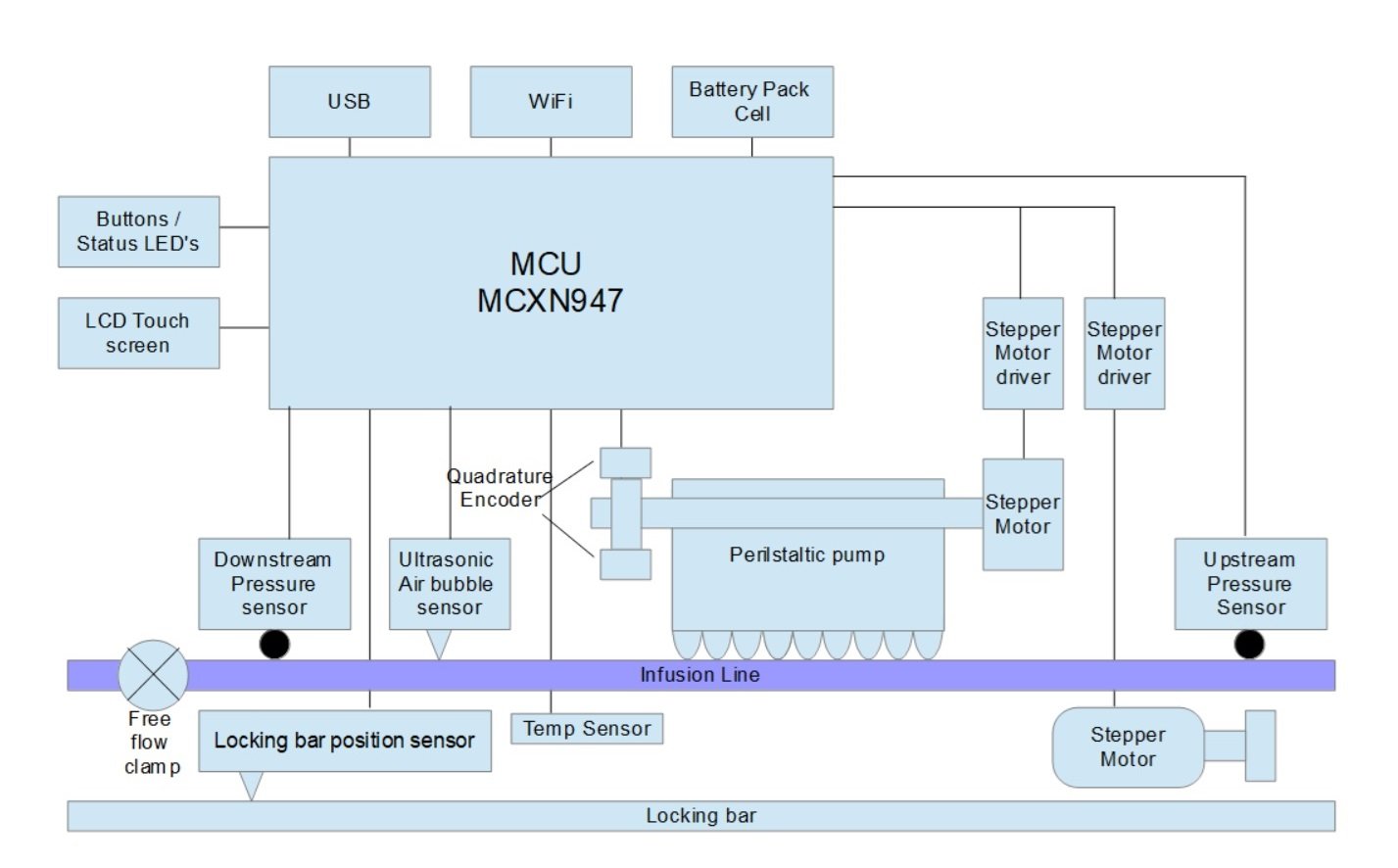
Functional Block Diagram Description
The embedded system is architecturally structured around NXP MCXN947 MCU.
Sensors
Provide a description of the sensors used in device and how they connect to other components and communicate with processor.
Pressure Sensors
Upstream and Downstream pressure sensor capture real-time pressure data in line during infusion
– SPI Communication with Processors: Both pressure sensors interface and transmit their data to the MCU using the SPI protocol.
– Usage: Upon detection of high pressure in line, signals MCU to halt infusion and generate high pressure alarm, in both upstream and downstream directions. Pressure limits to be decided.
– Component: Honeywell FMAMSDXX015WCSC3
Ultrasonic Air Bubble Detector
Detects air bubbles in the fluid line during the infusion process. Undetected air bubbles can lead to potentially harmful air embolisms when entering the patient’s bloodstream.
– UART Communication with Processors: Communicates to MCU via UART.
– Usage: Upon detection of air bubble, signals MCU to halt infusion and generate air bubble alarm.
Locking Bar Positioning Sensor:
Linear Potentiometer connected to MCU, determines position of locking bar on pump housing. Identifies open and close status of pump door.
– Analogue Input: Linear Pot outputs voltage value that onboard ADC must process.
Light Barrier Quadrature Encoder:
Used to tell direction and step count of stepper motor driving perilstatic pump.
– Working Principle: Quadrature encoder generates two square waveforms. The relative phase shift between these two waveforms determines the direction of movement. Encoder disc attached to motor shaft and perilstatic pump shaft generate quadrature encoder signal passed to the MCU.
Device Based Free Flow clamp detector:
Light barrier used to detect free flow clam is open or closed, crimping the line.
Other ICs
Other IC subsystems are used within the device to control and deliver various aspect of the infusion functionality.
• Stepper Motor Driver Two Trinamic TMC2300 Stepper motor drivers to control peristaltic pump and locking bar.TMC2300 is a compact stepper motor driver, optimized for battery-driven applications due to its ultra-low power consumption .
– Working Principle: UART interface from MCU to TMC2300 to configure parameters such as motor current, micro stepping resolution and other parameters to be decided. MCU send motion-related commands via UART, instructing the TMC2300 on the direction, speed, and number of steps the stepper motor should take. TMC2300 can send back status information, like motor load or error states, to the microcontroller using the same UART channel, allowing for real-time monitoring and adjustments.
– UART Communication with MCU: UART communication between MCU and TMC2300.
– Component: Trinamic TMC2300
Processor:
Primarily responsible for processing data from the all sensors, controlling all actuators, and displaying the GUI. This processor executes the main functional logic of the system. All sensor output connected to MCXN947.
Functional Requirements
User Interface Displays:
Main Screen: Shows the current status of the infusion, including fluid type, infusion rate (ml/hour), and total volume infused.
History Log: Provides a chronological list of previous infusions, alarms, and user actions, with the option to delve into specific details for each entry.
Alarms & Alerts:
Air-in-line: Detects and alerts if there are air bubbles in the tube.
Occlusion: Alerts when there is a blockage preventing fluid flow.
Low Battery: Signals when the battery is running low, and another when it’s critically low.
End of Infusion: Notifies when the infusion is complete or the fluid bag is empty.
Incorrect Setup: Warns if the setup deviates from recommended parameters or if incompatible accessories are detected.
Dosage Error: Alarms if the selected dosage is outside the safe or recommended range from the drug library.
Controls:
Touchscreen Panel: Enables direct interaction with the software interface, allowing users to navigate menus, input data, and confirm actions.
Physical Buttons:
Start/Pause: Initiates or pauses an infusion.
Bolus: Triggers a bolus infusion based on preset parameters.
Stop/Cancel: Terminates the current action or infusion.
Silence Alarm: Mutes active alarms for a designated period.
Arrow Keys:
Helps to set the infusion rate, volume, or navigate through options.
Lock Mechanism:
A security feature that requires a PIN or pass-code to access or modify crucial settings to prevent unauthorized changes.
Indicators LEDs:
Power Indicator: Shows whether the pump is on or off.
Battery Status: Indicates if the pump is charging, charged, or running on battery.
Alarm Indicator: Flashes during an active alarm state.
Feedback Mechanisms:
Audible Tones: Sound signals for various functions, e.g., button press confirmation, start/end of infusion, or when attention is needed.
Connectivity Indicators:
Wi-Fi or Network Symbol: Indicates whether the pump is connected to a central monitoring system or hospital network, showing the strength of the signal or the status of the connection.
This software user interface aims to provide a seamless and intuitive experience for healthcare professionals, ensuring patient safety, efficient drug delivery, and effective monitoring of the infusion process.
Operational Modes
Operational Modes of an Infusion Pump:
Continuous Mode:
Description: In this mode, the infusion pump delivers medication or fluids at a steady, constant rate until the prescribed volume is administered or the infusion is stopped manually.
Applications: Maintenance fluids such as saline or dextrose solutions. Continuous drug therapies, like insulin or heparin drips.
User Interface Elements: Display shows the ongoing rate (e.g., ml/hour) and total volume infused. Option to adjust the rate as prescribed. Real-time visualization of the infusion’s progress.
Bolus Mode:
Description: This mode allows for a rapid delivery of a specific volume of medication or fluid over a short duration, usually at a faster rate than the usual infusion.
Applications: Situations demanding a quick therapeutic response, like pain relief. Loading doses of certain medications.
User Interface Elements: Option to set the bolus volume and delivery rate. A clear indication when bolus delivery is in progress. Alert once the bolus delivery is complete.
Intermittent Mode:
Description: Intermittent infusion involves giving medication at intervals. Instead of a continuous flow, the pump administers the medication periodically at specified times and rates.
Applications: Antibiotic or antiviral therapies where doses are required several times a day. Medications that shouldn’t be continuously infused to avoid saturation or toxicity.
User Interface Elements: Option to set the volume, rate, and timing intervals for each dose. Countdown or timer displaying time until the next dose. History logs showing past intermittent infusions.
Each of these operational modes caters to different clinical needs and has been designed to ensure that the patient receives the most appropriate treatment in the safest and most effective manner. Proper understanding and selection of the correct mode are essential for healthcare professionals to ensure optimal therapeutic outcomes.
Safety Measures
Drug Library Integration: The software has a built-in drug library that contains recommended dosage ranges, contraindications, and other vital information to avoid drug administration errors. If a user tries to set a dose outside of the recommended range, the software will trigger an alert.
User Authentication: To prevent unauthorized access, modifications, or misuse, the software requires user login or authentication, such as a PIN, passcode, or even biometric verification.
Occlusion Detection: If there’s a blockage or obstruction in the tubing, the software detects the increased pressure and triggers an alarm while pausing the infusion.
Error Logs and Reporting: The software maintains detailed error logs, capturing any malfunctions, discrepancies, or user interventions. This allows for post-incident analysis and corrective measures.
Alarms and Alerts: In case of issues like low battery, end of infusion, or deviation from set parameters, the software sends out audible and visual alarms.
Automatic Shutdown: In scenarios where critical malfunctions are detected or battery levels are critically low, the software will safely shut down the pump to prevent harm.
Dosage Limitations: The software will have upper and lower dosage limits for infusions. If set values exceed these boundaries, the software will not allow the operation to continue without an override.
Feedback Mechanisms: Provides visual, audible, or even tactile feedback to confirm user actions, ensuring that inputs match intended commands.
Data Redundancy and Backup: The software constantly backs up essential data, ensuring that in case of unexpected shutdowns or errors, information is not lost.
Real-time Monitoring: Continuously monitors the infusion’s progress, comparing actual versus intended rates, and alerting if there’s a deviation.
Connectivity Alerts: If the pump loses connection to the central monitoring system or hospital network, an alert is raised to ensure continuous monitoring.
Over-infusion Prevention: Limits are set to prevent over-infusion. If the pump is nearing the prescribed volume, the software will slow down or stop the infusion.
System Diagnostics: On startup and periodically during operation, the software runs diagnostic checks on the pump’s hardware and its own operational integrity.
Firmware and Software Updates: Regular updates ensure that the pump’s software remains up-to-date with the latest safety protocols and bug fixes.