One unchanged value can hide a different part number
Imagine preparing a repeat PCB assembly order. The old and new BOMs both list five references, and R1 still says 10k in the value column. However, its manufacturer part number has changed. A visual check of row counts or displayed values would not answer which changes need approval.
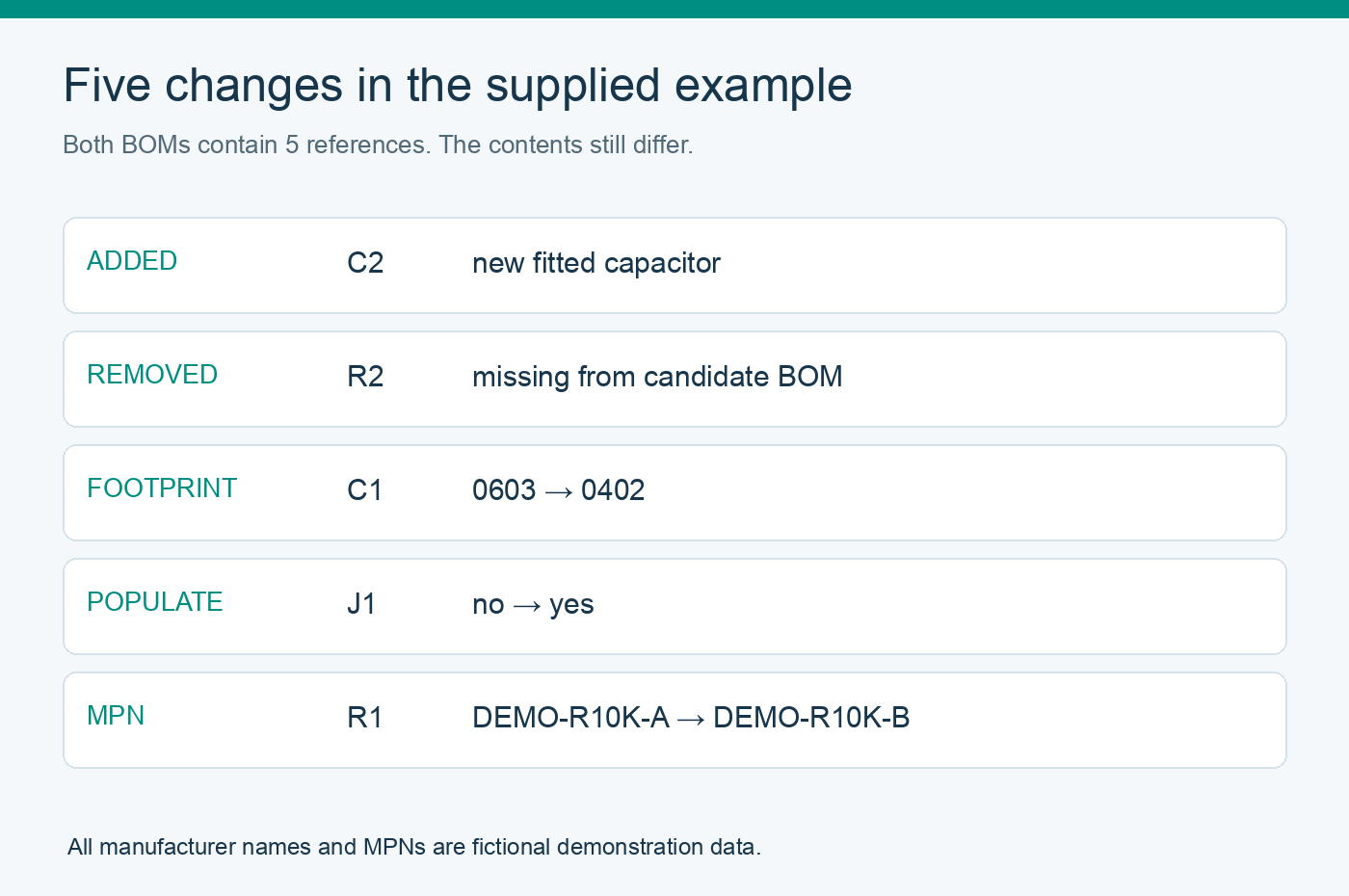
This project builds a small local comparison tool that produces a reference-by-reference change list. The attached example contains an added part, a removed part, a footprint change, a manufacturer part number change and a do-not-populate change. You can reproduce the result before using a mapped copy of your own data.
All example manufacturers and MPNs are fictional. These are training CSVs, not a tested circuit or manufacturing package. Development and documentation used AI assistance; the included test suite was actually run. No board fabrication or electrical test is claimed.
What you need
- Python 3.9 or newer on your computer.
- The attached AtlasPCB-BOM-Revision-Review.zip. No external Python packages are required.
- Two BOM exports for the intended assembly variant, plus the authoritative release notes when reviewing real work.
Extract the archive and open a terminal in its bom-revision-review folder. It contains the program, before.csv, after.csv, a report example, twelve tests and a blank review-log template. Processing stays local; the tool makes no network requests and never rewrites the input BOMs.
1. Agree on exactly which data will be compared
The six CSV headers are: reference,value,footprint,manufacturer,mpn,populate. Column order can differ, but header spelling must match. Start with the supplied files before mapping a copy of a real export.
Use one explicit reference per row. For example, R1 and R2 must be two rows, even if both use the same component. Grouped strings such as R1,R2 and ranges such as R1-R3 are rejected. If the source is grouped, un-group it in the source tool or carefully expand a copy; deleting a quantity column from a grouped BOM is not sufficient.
The parser accepts UTF-8 CSV, including a UTF-8 byte order mark and quoted commas. It rejects duplicate references, unknown headers, empty files and malformed rows. References are trimmed and uppercased so r1 and R1 cannot silently become two parts. Multiline field values and control characters are rejected.
Map fitted status explicitly: yes, true or 1 means fitted; no, false, 0, dnp or dnf means not fitted. Blank or unrecognized values stop the comparison. This prevents an ambiguous empty cell from being silently treated as an assembly decision.
Manufacturer, MPN, value and footprint are compared as trimmed exact text. The tool does not decide that two resistor descriptions are equivalent or that two manufacturers' part numbers are interchangeable. It will flag a spelling change too; a reviewer decides whether that change is administrative or substantive.
2. Run the supplied changed-revision example
Run this command from the extracted folder:
python3 bom_revision_review.py before.csv after.csv --report review.txt
The terminal displays the comparison and writes a new review.txt file. The expected exit code is 1, meaning differences were found. That is the intended result for this example, not a failed installation. The report path must be new; to repeat the command, choose another filename or omit --report.
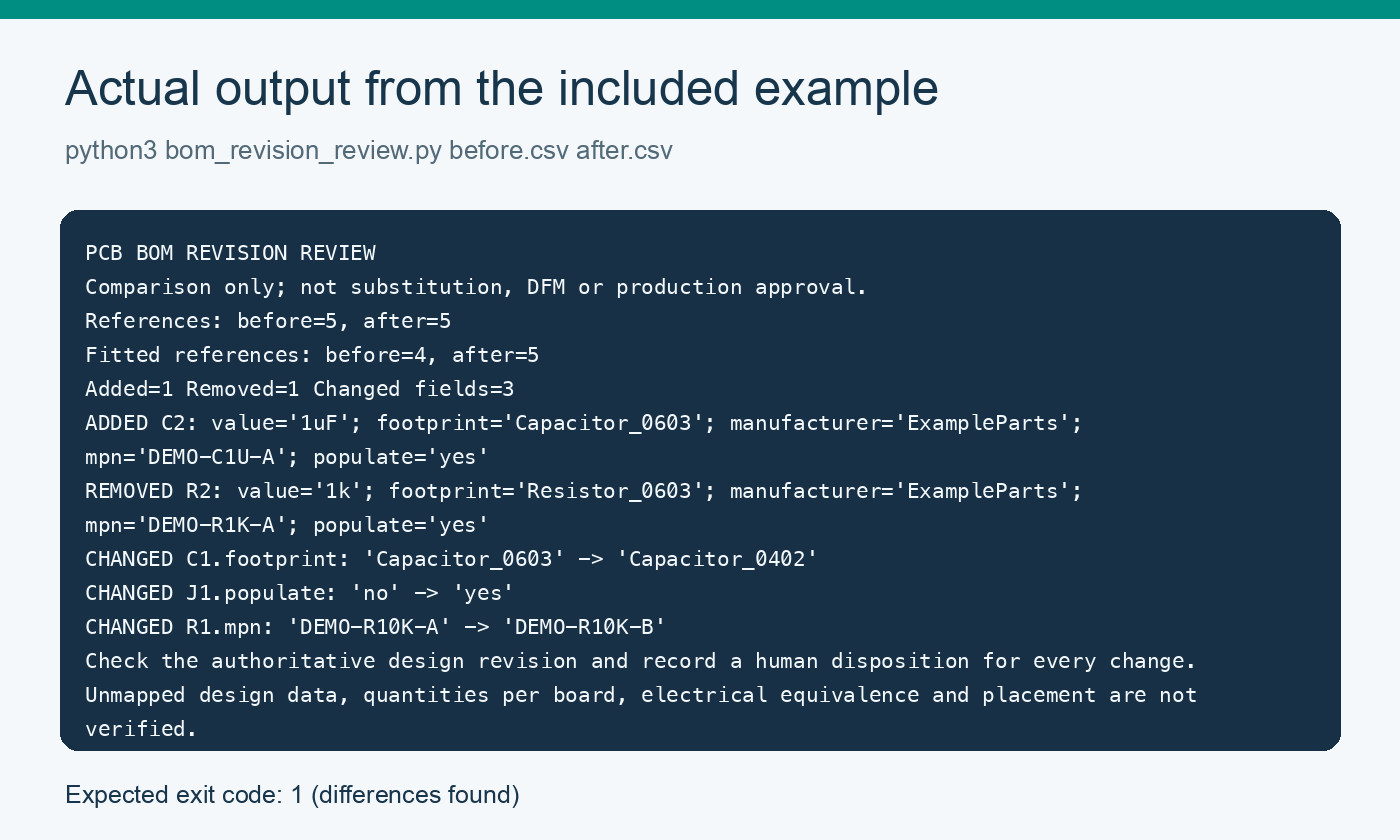
The actual output is:
PCB BOM REVISION REVIEW
Comparison only; not substitution, DFM or production approval.
References: before=5, after=5
Fitted references: before=4, after=5
Added=1 Removed=1 Changed fields=3
ADDED C2: value='1uF'; footprint='Capacitor_0603'; manufacturer='ExampleParts'; mpn='DEMO-C1U-A'; populate='yes'
REMOVED R2: value='1k'; footprint='Resistor_0603'; manufacturer='ExampleParts'; mpn='DEMO-R1K-A'; populate='yes'
CHANGED C1.footprint: 'Capacitor_0603' -> 'Capacitor_0402'
CHANGED J1.populate: 'no' -> 'yes'
CHANGED R1.mpn: 'DEMO-R10K-A' -> 'DEMO-R10K-B'
Check the authoritative design revision and record a human disposition for every change.
Unmapped design data, quantities per board, electrical equivalence and placement are not verified.
3. Interpret each change before changing the order
- R1.mpn changes from DEMO-R10K-A to DEMO-R10K-B. Its displayed value and footprint remain unchanged. Ask why the MPN changed and inspect the relevant approved sourcing and design evidence. The report cannot authorize a substitute.
- C1.footprint changes from Capacitor_0603 to Capacitor_0402. Check the intended package, land pattern and assembly data together. The program only sees these strings; it does not measure pads or inspect a manufacturer's package drawing.
- J1.populate changes from no to yes. Confirm that this belongs to the intended assembly variant, then review the BOM and placement scope. The fitted-reference count rises from four to five.
- R2 is removed and C2 is added. Confirm the changes against release notes and the authoritative design. The total reference count remains five, illustrating why a matching row count is not enough.
The fitted-reference total is simply the number of rows marked yes. It is not a validated purchasing quantity: the tool does not handle panel multipliers, spare parts, assembly attrition or grouped quantity fields.
4. Save a human review beside the machine report
Use the included review-log-template.csv to record a reason, supporting evidence, reviewer, disposition and release identifier for each flagged item. These fields are deliberately blank; a tool cannot approve changes on the team's behalf.
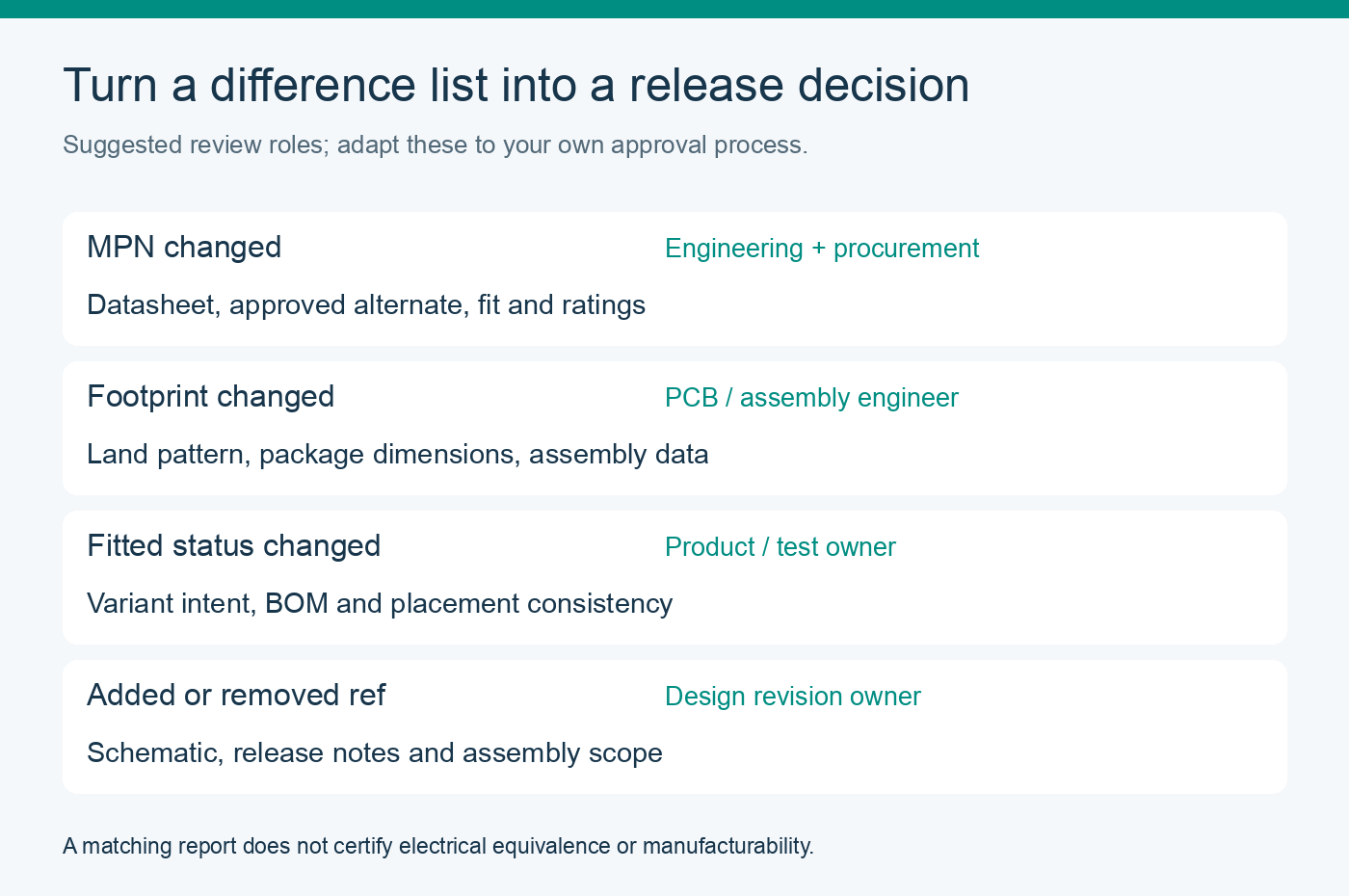
Suggested review owners are engineering and procurement for an MPN change, the PCB or assembly engineer for a footprint change, and the design or variant owner for fitted-state and membership changes. Adapt these roles to your actual approval process. Do not simply replace the baseline to make an unexpected difference disappear.
Keep the original exports, the mapped CSV copies, the comparison report and the human disposition with the release record. Select the correct pair of assembly variants first. Stop editing the files while the program reads them; this is not an atomic snapshot or a release-control system.
5. Test the tool and understand its return codes
python3 -m unittest -v test_bom_revision_review.py
The package contains twelve tests, covering an MPN change with the same displayed value, added and removed references, fitted-status aliases, row reordering, reference normalization, duplicate references, grouped-reference rejection, quoted commas, UTF-8 BOM input, schema errors, incomplete fitted-part data and report-overwrite protection.
For a no-change example, run:
python3 bom_revision_review.py before.csv before.csv
Return code 0 means no differences in the six mapped columns. Return code 1 means at least one added, removed or changed item. Return code 2 means an input or output problem, such as malformed CSV or an existing report filename. Blank identity fields on fitted parts produce explicit warnings even when there are no differences; inspect them rather than treating code 0 as approval.
What this comparison cannot prove
Two identically wrong BOMs can produce a no-difference report. This tool does not inspect Gerbers, placement coordinates, rotations, schematic connectivity, electrical ratings, approved alternates, supplier stock or manufacturability. It also cannot detect data omitted during an incorrect export-to-schema mapping. Keep those engineering and sourcing checks in the release process.
The source and example files are MIT licensed. Prepared by Diana Ren at AtlasPCB, a PCB sourcing and supply-chain partner. The full implementation and practice data are attached here, so a company-site visit is not required to reproduce the project.


