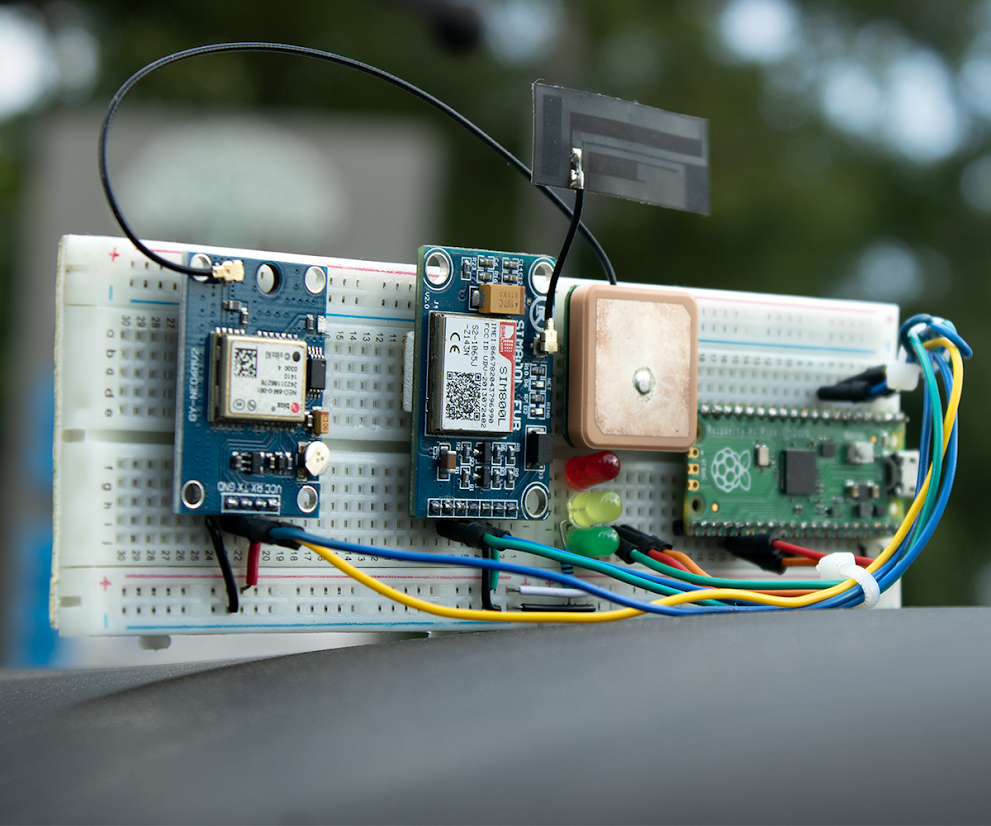
The Raspberry Pi Pico talks to two modules. The first is the Neo-6M GPS module, which listens to satellites and gives us latitude and longitude. The second is the SIM800L GSM module, which uses a 2G cellular network to send that location data to the cloud. To visualize the data, we use the Circuit Digest GeoLinker API.
What You Need
- Raspberry Pi Pico or Pico W
- SIM800L GSM Module
- Neo-6M GPS Module
- GPS antenna for better reception
- GSM antenna for network connectivity
- A 2G SIM card such as Airtel
- Three LEDs for status indication
- Breadboard and jumper wires
- A stable battery (3.7V to 4.2V with at least 2A peak current)
Important: SIM800L is very sensitive to power. Always use a regulated 3.7V to 4.2V supply. A LiPo battery works best.
Getting to Know the Modules
SIM800L GSM Module
This little board works on 2G networks around the world. It can handle voice, SMS, GPRS data, and even HTTP requests through simple AT commands. Just remember that it can draw up to 2A in short bursts, so a good power supply is a must. An external GSM antenna is also required for reliable performance.
Neo-6M GPS Module
This module is designed by u-blox and is very popular in DIY electronics projects. It outputs GPS data using NMEA sentences, which include information like latitude, longitude, altitude, speed, and time. Under a clear sky, it can achieve about 2.5-meter accuracy. Add an active antenna for better reception, and you are ready to go.
Wiring the Circuit
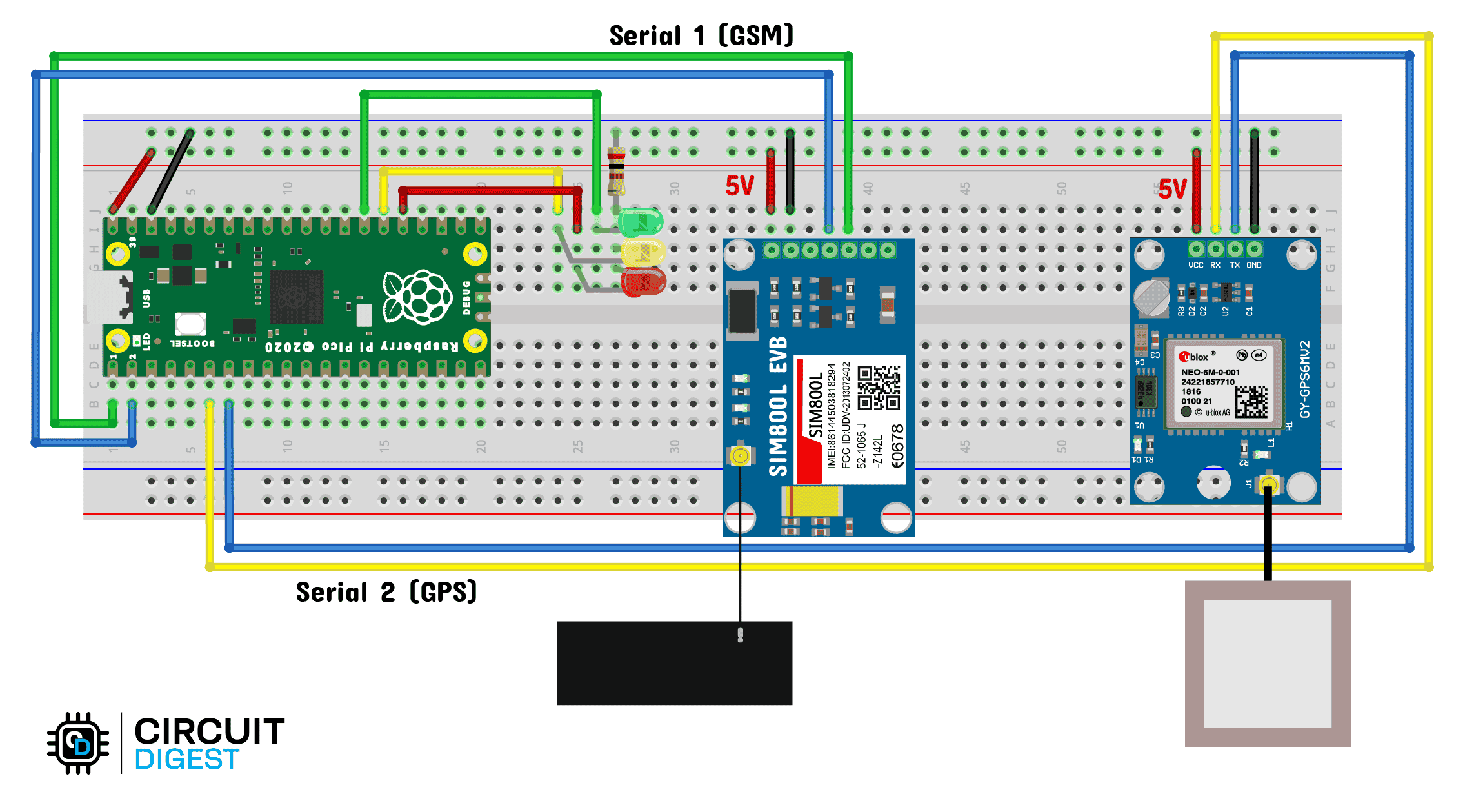
Here is how you connect everything to the Pico:
SIM800L to Pico
- TX to GP1 (RX)
- RX to GP0 (TX)
- GND to GND
- VCC to 3.7–4.2V battery
Neo-6M to Pico
- TX to GP5 (RX)
- RX to GP4 (TX)
- GND to GND
- VCC to 3.3V or 5V depending on your module
Always make sure all modules share a common ground with the Pico.
Setting Up the Cloud
- Create an account at circuitdigest.cloud
- Generate an API key from your account dashboard.
- Add this key in your Arduino sketch.
- Once your Pico starts transmitting, the data points will show up on a map in real time.
The free plan allows up to 10,000 GPS points per key, which is more than enough for testing and hobby use.
Preparing the Arduino IDE
- Open Arduino IDE and go to File > Preferences.
- Add this URL in Additional Board Manager URLs:
- ttps://github.com/earlephilhower/arduinopico/releases/download/global/package_rp2040_index.json
- Install the board package called Raspberry Pi Pico / RP2040 by Earle Philhower.
- Go to Library Manager and search for GeoLinker. Install it.
- Open the example sketch under File > Examples > GeoLinker, paste your API key, and upload it to the Pico.
Testing the Tracker
Once you power everything with a stable battery, the GPS module will start searching for satellites. Its LED will blink faster once it has a fix. The Pico will then send coordinates through the SIM800L. Open your Circuit Digest Cloud account and you will see the live path drawn on a map.
Where Can You Use It?
- Keep track of your car or bike routes
- Monitor shipments or valuable assets
- Attach it to your pet's collar
- Use in logistics to monitor delivery routes
Troubleshooting Tips
- If GPS does not lock, move to an open area with a clear view of the sky.
- If the SIM800L does not connect, check the SIM card, antenna, and power supply.
- If data does not appear on the map, confirm your API key and wiring.
Conclusion
This project shows how a few inexpensive parts can become a powerful IoT device. The Raspberry Pi Pico, combined with SIM800L and Neo-6M, gives you a reliable GPS tracker that can handle real-time data, network drops, and cloud visualization. You can extend it further by adding sensors, SMS alerts, or even storing data on an SD card.
It is a great way to learn about GPS, GSM, UART communication, and cloud integration, all while building something useful.
You'll find a more comprehensive version of this tutorial here: Raspberry Pi Pico GPS Tracker